
IRS 20-point checklist for independent contractors
Need a quick and easy way to navigate your IRS 20-point checklist? Look no further. Payoneer Workforce Management team provides a free online checklist with PDF download.


The IRS 20-point checklist (also referred to as the “employee vs contractor checklist” sometimes) is a set of guidelines created in 1987 under IRS Revenue Ruling 87-41 to determine whether a new worker would be classified as an employee or a contractor. Due to the heavy fines and penalties associated with misclassification, it has become an essential tool for onboarding and HR.
Unfortunately, utilizing the traditional checklist can be confusing. Employees inevitably fall into gray areas between classifications, and the phrasing of certain questions leaves significant room for interpretation.
So, we have created the following resource for business owners to easily run through the IRS 20-point checklist, as presented below.
How do I use the IRS 20-point checklist?
Although none of the 20 points are explicitly more important than the others, the IRS (as well as the courts) has historically leaned on certain points more than others, prioritizing a “totality-of-the-circumstances” analysis.
To provide a sense of these leanings, we have included a subjective 1-10 score for each point, indicating how much they “weigh.”
With that in mind, here’s a quick breakdown of how to use our IRS 20-point checklist:
- Answer each question as best you can. Include notes where necessary.
- Calculate totals for number and weight. The number is important, but weight is most important. If the results are unclear, revisit the position being offered to ensure that terms are clearly stated, and speak with a specialist if you are still having difficulty.
- Take a gut check. Remember, the checklist is not perfect; a result indicating one way may actually be another when considering the totality of the circumstances. If you are unsure at this stage, speak with a specialist, as discussed in the sections below.
- Take action
- If employee: Begin work with HR filing a W2
- If contractor: Review contractor agreement
A simpler way to qualitatively evaluate this question is to consider how much power the worker has in their relationship with the company; do they operate like a business, with other clients they provide services to, or do they operate under the company’s control?
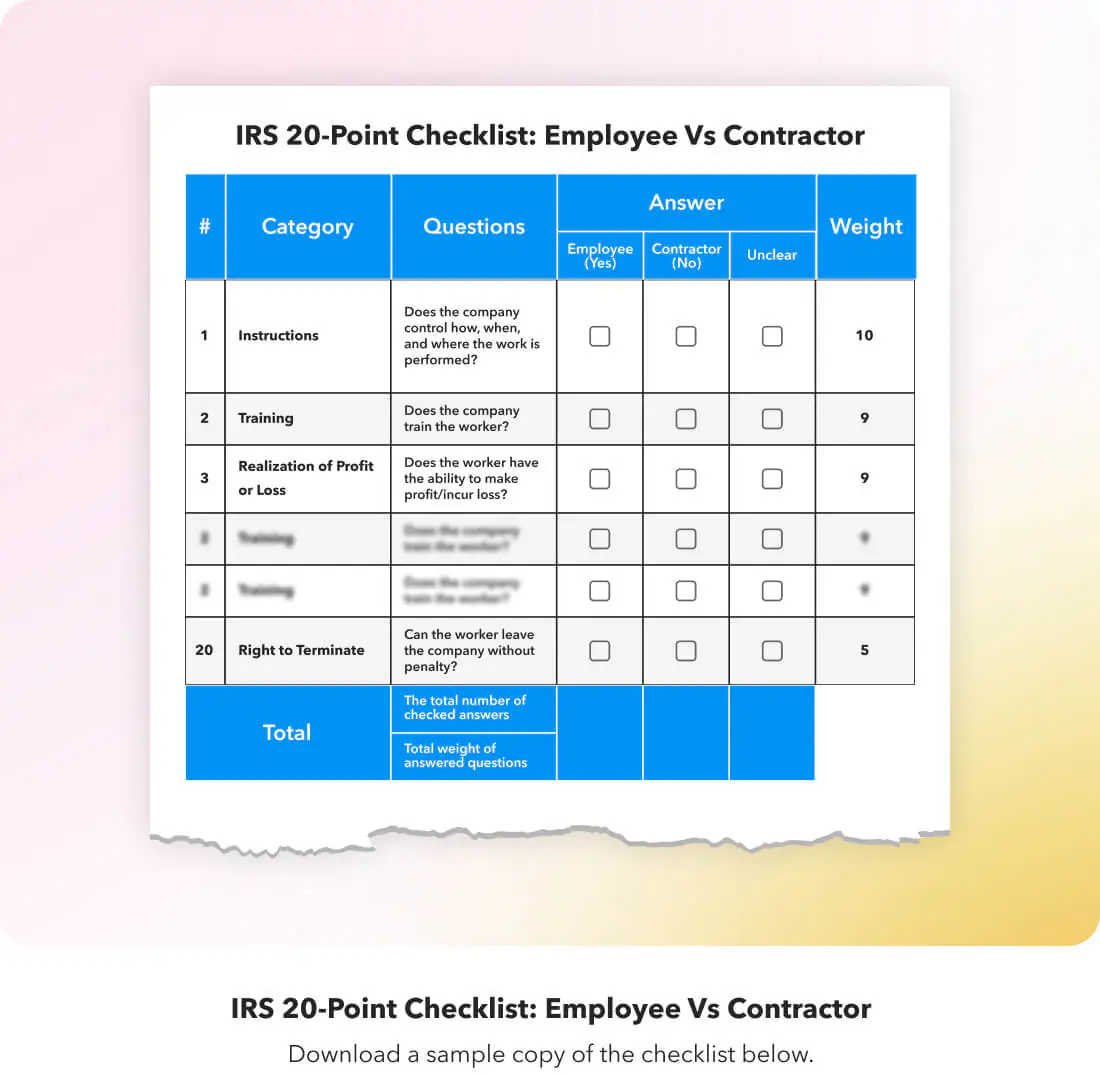
IRS 20-Point Checklist: Employee vs Contractor
Are there any “rules of thumb” I should know?
When running a new worker through the IRS 20-point checklist, there are a few things you should keep in mind:
- Be sure to document your reasoning: Misclassification is the central concern surrounding the employee vs contractor checklist, so write down why you answered a question a certain way, especially in cases where the answer falls into a gray area. In the event your company is ever audited, these records can make the difference between paying back taxes, penalties, and liabilities.
- Be cautious: Err on the side of “Employee” when you are genuinely not sure how to answer a question, as the penalties for misclassifying a contractor as an employee are significantly less severe than those for misclassifying an employee as a contractor.
- Consult an expert if you are unsure: If you have completed the employee vs contractor checklist and are still unsure of how to proceed, it’s best to work with a specialist in this area. Consult employment attorneys, tax attorneys, CPAs, or HR compliance consultants.
If you want to make the process easier on yourself, however, global payroll or EOR providers offer business owners the means to reduce misclassification errors before they ever occur.
Still unsure of how to implement your employee vs contractor checklist?
It’s perfectly normal to feel overwhelmed when onboarding new talent. Using the IRS 20-point checklist is meant to be more of a qualitative practice than a quantitative science, which is often the source of confusion and stress.
If you would like to have a PDF, you are free to download it here.
If you would like to get an expert opinion on your onboarding practices, our best advice is to work with an expert.
Payoneer Workforce Management provides a suite of services to hire, onboard, and manage employees in your business ecosystem.
Hire & pay globally with Payoneer Workforce Management
- Expand internationally in 160+ countries
- Run global payroll securely in a few clicks
- Stay compliant with local employment laws
- Let Payoneer Workforce Management manage benefits, work permits, timesheets, and more so you don’t have to


Schedule a demo
Related resources

Payoneer Workforce Management named a leader across 12 categories in G2’s Summer 2026 reports
In G2’s Summer 2026 Reports, Payoneer Workforce Management earned leadership recognition across global workforce categories for its reliable payroll, onboarding, compliance, and Employer of Record solutions.


Planning to hire employees in Bulgaria? Here’s a quick guide
Learn how to hire employees in Bulgaria. Covers contracts, work permits, payroll, leave laws, and how Payoneer Workforce Management supports compliance.
Employment laws in Bulgaria
Learn about labor laws compliance in Bulgaria, including contracts, working hours, statutory rights, termination, notice periods, and severance.

Employment laws in Israel
Learn about employment laws in Israel, from contract terms to working hours, from minimum wage to mandatory benefits. Ensure labor law compliance in Israel.
Leave policy in Israel
Explore the leave policy in Israel covering annual leave, sick leave, maternity, paternity leave, and public holidays. Stay compliant with leave laws in Israel.
Your guide to payroll in Bulgaria
Learn how payroll in Bulgaria works, covering income tax, social security, minimum wage, payslip rules, and how to stay compliant after euro adoption.
Leave policy in Bulgaria
A guide to leave laws in Bulgaria, covering annual leave, public holidays, sick leave, maternity and paternity leave, and statutory leave entitlements.

Employment laws in Austria
Labor laws compliance in Austria explained: contracts, working hours, mandatory benefits, notice periods, severance, and key statutes every employer needs.
Leave policy in Austria
Understand leave laws in Austria covering annual leave, sick pay, maternity, paternity, parental leave, and other statutory entitlements that employers must offer.
Latest articles
-

Discover Your All-In-One Ecommerce Payments Solution
Learn how eCommerce businesses can use Payoneer to receive marketplace payments, pay suppliers, manage multiple currencies, access working capital, and streamline global business payments.
-
Your Business Payments Are in Good Hands
Learn how to use Payoneer to receive payments from clients and marketplaces, access your funds, pay suppliers, manage currencies, and use additional tools that help simplify global business payments.
-
Avail the Most Trusted Payment Partner in India
Learn how businesses in India can use Payoneer to receive cross-border payments, withdraw earnings automatically, access Digital FIRCs, pay European VAT, and manage international business payments from one account.
-
Discover Payoneer’s Services for Your Business
Learn how to make the most of your Payoneer account, from receiving international payments and requesting payments from clients to withdrawing funds, paying suppliers, managing currencies, and accessing additional business tools.
-
How to Integrate Payoneer Checkout with Ueeshop
Learn how to integrate Payoneer Checkout with Ueeshop, configure your payment setup, and discover how to accept secure payments while supporting your cross-border ecommerce business.
-
How to Integrate Payoneer Checkout with WooCommerce
Learn how to integrate Payoneer Checkout with WooCommerce, configure your preferred checkout experience, and start accepting secure online payments through your WordPress store.






Disclaimer
The information in this article/on this page is intended for marketing and informational purposes only and does not constitute legal, financial, tax, or professional advice in any context. Payoneer and Payoneer Workforce Management are not liable for the accuracy, completeness or reliability of the information provided herein. Any opinions expressed are those of the individual author and may not reflect the views of Payoneer or Payoneer Workforce Management. All representations and warranties regarding the information presented are disclaimed. The information in this article/on this page reflects the details available at the time of publication. For the most up-to-date information, please consult a Payoneer and/or Payoneer Workforce Management representative or account executive.
Availability of cards and other products is subject to customer’s eligibility. Not all products are available in all jurisdictions in the same manner. Nothing herein should be understood as solicitation outside the jurisdiction where Payoneer Inc. or its affiliates is licensed to engage in payment services, unless permitted by applicable laws. Depending on or your eligibility, you may be offered the Corporate Purchasing Mastercard, issued by First Century Bank, N.A., under a license by Mastercard® and provided to you by Payoneer Inc., or the Payoneer Business Premium Debit Mastercard®, issued and provided from Ireland by Payoneer Europe Limited under a license by Mastercard®.
Skuad Pte Limited (a Payoneer group company) and its affiliates & subsidiaries provide EoR, AoR, and contractor management services.
