
[VIDEO] How to Request a Payment From Your Payoneer Account
Learn how to request a payment from clients using your Payoneer account and simplify the way you collect international payments.
![[VIDEO] How to Request a Payment From Your Payoneer Account](https://www.payoneer.com/wp-content/uploads/Blog-image-02-6.jpg.webp "[VIDEO] How to Request a Payment From Your Payoneer Account - Blog image 02 6")
![[VIDEO] How to Request a Payment From Your Payoneer Account](https://secure.gravatar.com/avatar/6dba364e097cb11acdc6665c5b4a3aebd44792ad1d3ec88c09b1a34c3facfe8f?s=48&d=mm&r=g "[VIDEO] How to Request a Payment From Your Payoneer Account - 6dba364e097cb11acdc6665c5b4a3aebd44792ad1d3ec88c09b1a34c3facfe8f?s=48&d=mm&r=g")
Whether you’re a freelancer who’s just finished a project or a contractor who needs to bill a retainer fee, Payoneer’s Request a Payment makes it easier than ever to get paid.
How does it work?
1. Sign in to your Payoneer account.
Before you can start sending payment requests, you will be asked to provide information that verifies your identity and line of business. This is necessary to verify that your business is supported under our terms of service and to prevent fraud or identity theft. If any additional information is needed, we will contact you by email.
2. From the menu, go to Receive >> Request a Payment.
![[VIDEO] How to Request a Payment From Your Payoneer Account](https://www.payoneer.com/wp-content/uploads/new-account-homepage-1.jpg.webp "[VIDEO] How to Request a Payment From Your Payoneer Account - new account homepage 1")
3. Select a payer you would like to send a request to from your contacts. If this is the first time you are requesting payment from this client, you’ll need to add a new payer.
![[VIDEO] How to Request a Payment From Your Payoneer Account](https://www.payoneer.com/wp-content/uploads/image2-selectpayer-1.jpg.webp "[VIDEO] How to Request a Payment From Your Payoneer Account - image2 selectpayer 1")
Select the payer type – either company or individual – and enter the payer details, including the payer name, website URL (if you are requesting payment from a company), email address and the payer’s country.
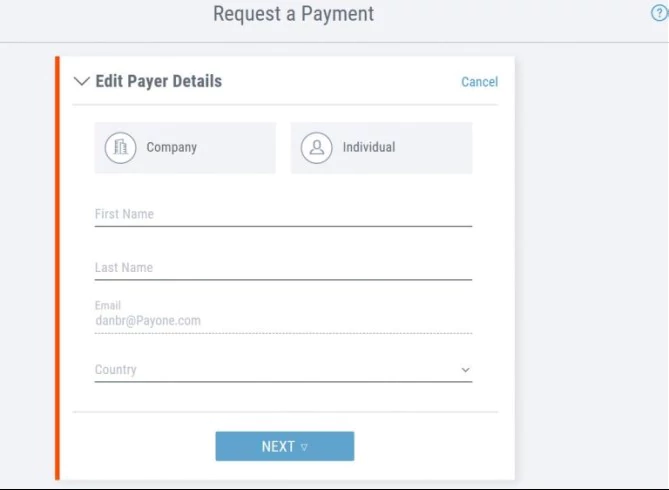
4. Enter the payment details, including:
- Amount
- Currency
- Date by which you should be paid – we’ll use this date to send automatic payment reminders
- Brief description of what you are requesting payment for – your payer will see this description in the payment request
5. Attach up to 5 documents to your payment request, such as an invoice, contract or work sample (optional)
![[VIDEO] How to Request a Payment From Your Payoneer Account](https://www.payoneer.com/wp-content/uploads/Request-a-payment-attach-documents.jpg.webp "[VIDEO] How to Request a Payment From Your Payoneer Account - Request a payment attach documents")
6. Click PREVIEW to see the email your payer will receive.
7. If all looks good, click REQUEST PAYMENT to send the request
![[VIDEO] How to Request a Payment From Your Payoneer Account](https://www.payoneer.com/wp-content/uploads/Image6-Request-payment-1.jpg.webp "[VIDEO] How to Request a Payment From Your Payoneer Account - Image6 Request payment 1")
8. We’ll send an email to your client with the details of the payment.
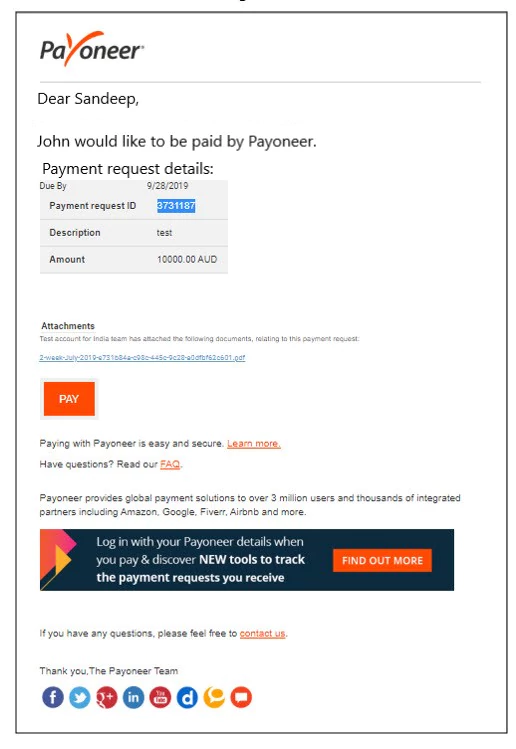
9. After clicking Pay Now, your client will be redirected to Payoneer’s payment platform where they can pay the bill. For a closer look at the payment process, check out this how-to for payers.
10. You’ll receive a confirmation email when the payment is approved, and another email to let you know that the payment has been credited to your Payoneer account. Your client will also be notified.
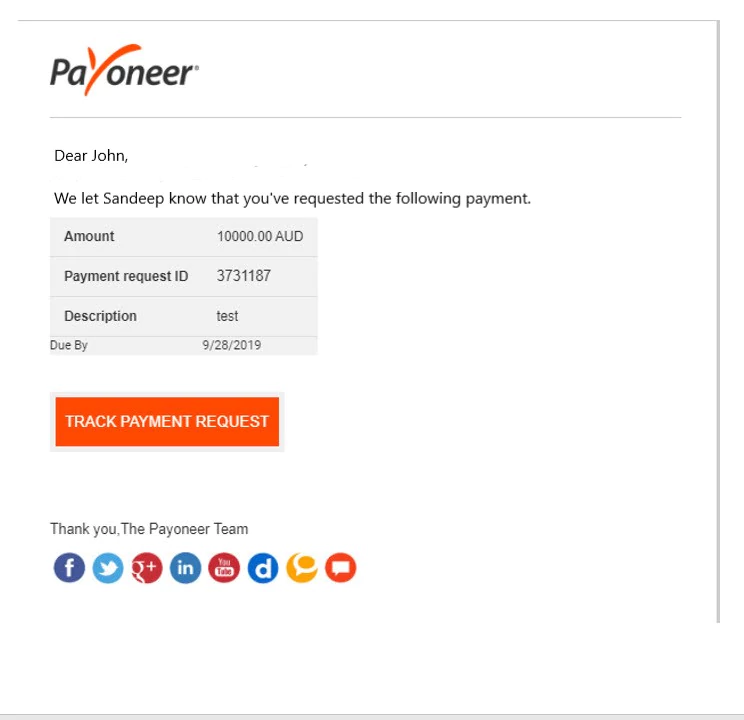
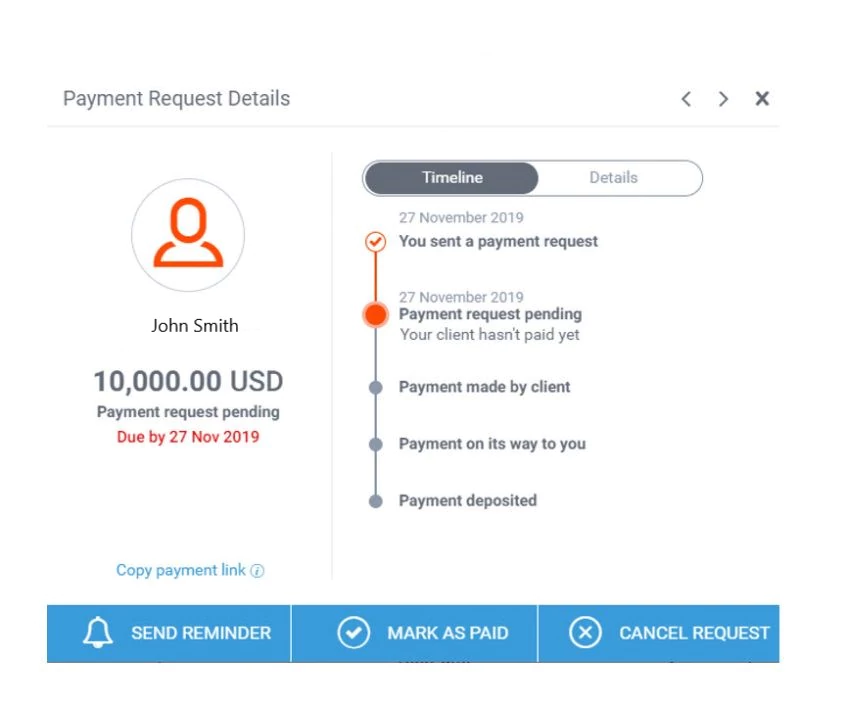
You can also track the status of your payment at any time, here’s how:
- Sign in to Payoneer
- Activity >> Payment Requests Sent
- You’ll see all payment request sent and their status
- Choose a specific payment request. From here, you can:
- Send your client a manual reminder
- Cancel the payment request
- Mark the request as paid, in case your client paid you another way
- Copy a direct URL to the payment platform that you can share with your payer
You’ve worked hard for your clients and delivered the goods. Now get ready to receive your payments in just a few simple steps. Ready to get started?
[cta-button text=”Request a payment now >>” url=”https://myaccount.payoneer.com?action=payment-request” color=”#FF4800″ type=”my-account-action”]
To read more about the service and requirements for eligibility, please see our full FAQ. Some transactions, such as selling goods directly to a consumer, are prohibited. Please see our Terms & Conditions for the full list of prohibited services.
Related resources

Discover Your All-In-One Ecommerce Payments Solution
Learn how eCommerce businesses can use Payoneer to receive marketplace payments, pay suppliers, manage multiple currencies, access working capital, and streamline global business payments.


Your Business Payments Are in Good Hands
Learn how to use Payoneer to receive payments from clients and marketplaces, access your funds, pay suppliers, manage currencies, and use additional tools that help simplify global business payments.

Avail the Most Trusted Payment Partner in India
Learn how businesses in India can use Payoneer to receive cross-border payments, withdraw earnings automatically, access Digital FIRCs, pay European VAT, and manage international business payments from one account.

Discover Payoneer’s Services for Your Business
Learn how to make the most of your Payoneer account, from receiving international payments and requesting payments from clients to withdrawing funds, paying suppliers, managing currencies, and accessing additional business…

How to Integrate Payoneer Checkout with Ueeshop
Learn how to integrate Payoneer Checkout with Ueeshop, configure your payment setup, and discover how to accept secure payments while supporting your cross-border ecommerce business.

How to Integrate Payoneer Checkout with WooCommerce
Learn how to integrate Payoneer Checkout with WooCommerce, configure your preferred checkout experience, and start accepting secure online payments through your WordPress store.

How to Integrate Payoneer Checkout with Shoplazza
Learn how to integrate Payoneer Checkout with Shoplazza, set up secure payment acceptance, and discover how a seamless checkout experience can support your online business.

How to Integrate Payoneer Checkout with Shopify
Learn how to integrate Payoneer Checkout with Shopify, set up secure online payments, and discover how a streamlined checkout experience can support your ecommerce growth.

How to Integrate Payoneer Checkout with Shopline
Learn how to integrate Payoneer Checkout with Shopline, set up your payment solution, and discover how it helps you accept secure payments and deliver a better checkout experience for customers.
Latest articles
-

Discover Your All-In-One Ecommerce Payments Solution
Learn how eCommerce businesses can use Payoneer to receive marketplace payments, pay suppliers, manage multiple currencies, access working capital, and streamline global business payments.
-
Your Business Payments Are in Good Hands
Learn how to use Payoneer to receive payments from clients and marketplaces, access your funds, pay suppliers, manage currencies, and use additional tools that help simplify global business payments.
-
Avail the Most Trusted Payment Partner in India
Learn how businesses in India can use Payoneer to receive cross-border payments, withdraw earnings automatically, access Digital FIRCs, pay European VAT, and manage international business payments from one account.
-
Discover Payoneer’s Services for Your Business
Learn how to make the most of your Payoneer account, from receiving international payments and requesting payments from clients to withdrawing funds, paying suppliers, managing currencies, and accessing additional business tools.
-
How to Integrate Payoneer Checkout with Ueeshop
Learn how to integrate Payoneer Checkout with Ueeshop, configure your payment setup, and discover how to accept secure payments while supporting your cross-border ecommerce business.
-
How to Integrate Payoneer Checkout with WooCommerce
Learn how to integrate Payoneer Checkout with WooCommerce, configure your preferred checkout experience, and start accepting secure online payments through your WordPress store.






Disclaimer
The information in this article/on this page is intended for marketing and informational purposes only and does not constitute legal, financial, tax, or professional advice in any context. Payoneer and Payoneer Workforce Management are not liable for the accuracy, completeness or reliability of the information provided herein. Any opinions expressed are those of the individual author and may not reflect the views of Payoneer or Payoneer Workforce Management. All representations and warranties regarding the information presented are disclaimed. The information in this article/on this page reflects the details available at the time of publication. For the most up-to-date information, please consult a Payoneer and/or Payoneer Workforce Management representative or account executive.
Availability of cards and other products is subject to customer’s eligibility. Not all products are available in all jurisdictions in the same manner. Nothing herein should be understood as solicitation outside the jurisdiction where Payoneer Inc. or its affiliates is licensed to engage in payment services, unless permitted by applicable laws. Depending on or your eligibility, you may be offered the Corporate Purchasing Mastercard, issued by First Century Bank, N.A., under a license by Mastercard® and provided to you by Payoneer Inc., or the Payoneer Business Premium Debit Mastercard®, issued and provided from Ireland by Payoneer Europe Limited under a license by Mastercard®.
Skuad Pte Limited (a Payoneer group company) and its affiliates & subsidiaries provide EoR, AoR, and contractor management services.
