
How To Update Your Local INR Bank Details
Whether you’re a small business, consultant or professional, getting paid is critical. With Payoneer, funds are transferred quickly and securely from companies worldwide to your local bank account in INR at low cost. Read on for a step-by-step guide to updating your personal bank account details with Payoneer. To Update Your Bank Details In compliance…


Whether you’re a small business, consultant or professional, getting paid is critical. With Payoneer, funds are transferred quickly and securely from companies worldwide to your local bank account in INR at low cost. Read on for a step-by-step guide to updating your personal bank account details with Payoneer.
To Update Your Bank Details
In compliance with local regulation in India, payments are transferred automatically from your Payoneer account to your local bank account within 24 hours. To keep your funds secure, we can allow only one bank account to be linked to your Payoneer account at a time. To update your bank details, follow these step-by-step instructions:
- Sign in to your Payoneer account.
2. Under Help, select Support Center
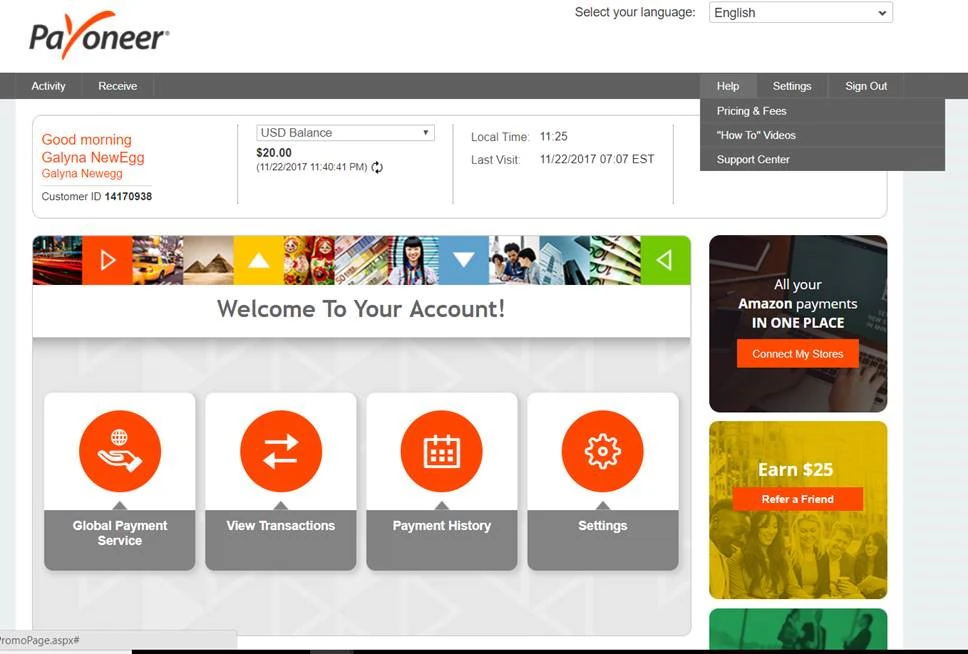
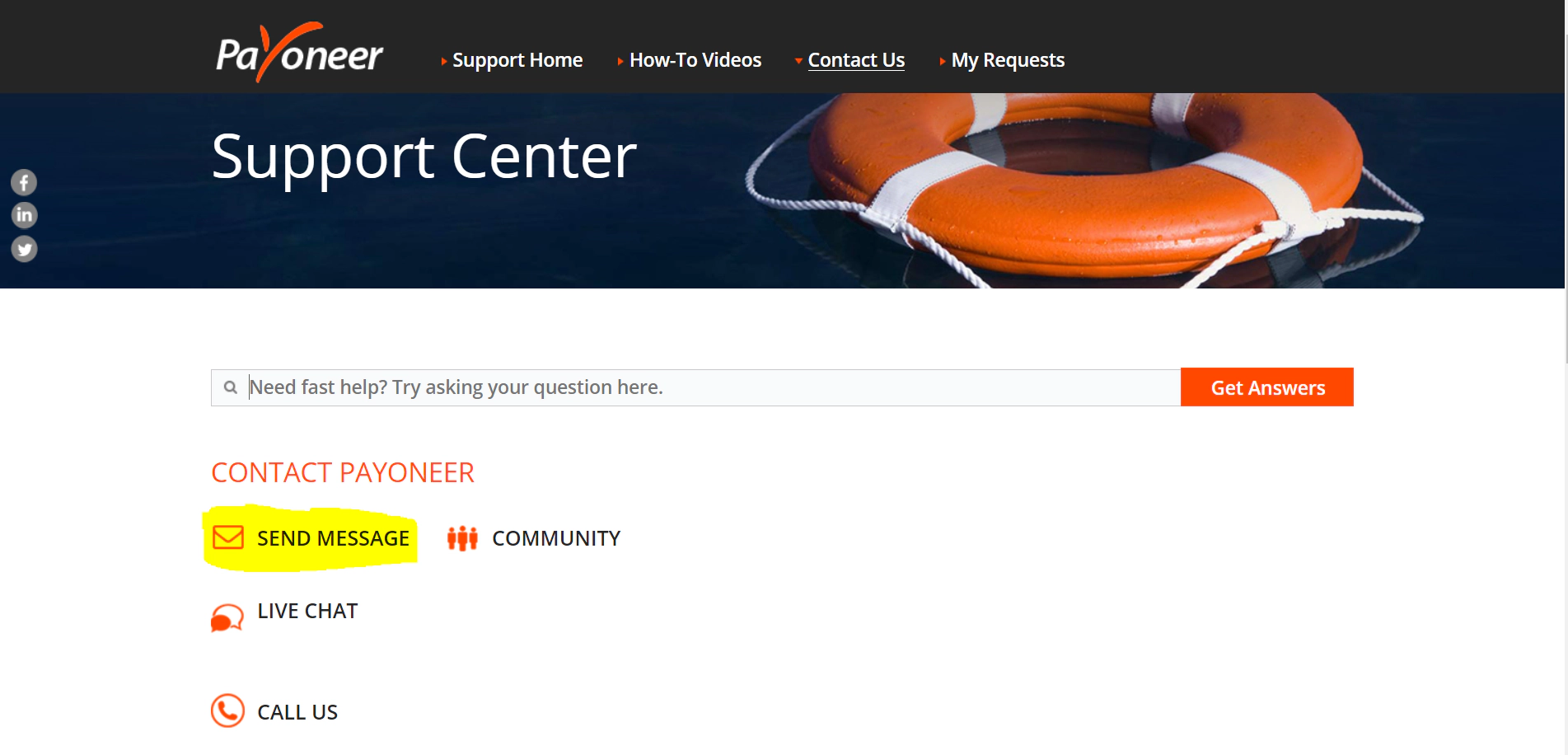
- Click on SEND MESSAGE.
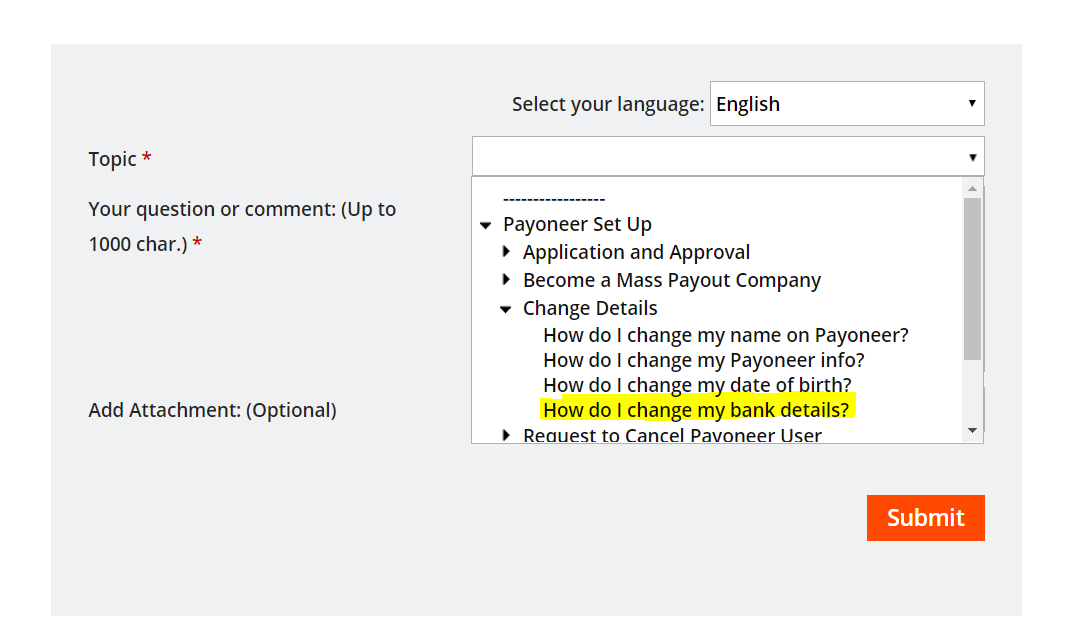
- In the Topic menu, select Payoneer Set Up-> Change Details -> How do I change my bank details?
- In the question/comment field, provide the following details:
- Reason for changing your bank details
- Date of birth
- Your Payoneer username (usually this is the email address associated with your account)
- Last 4 digits of the current bank account number
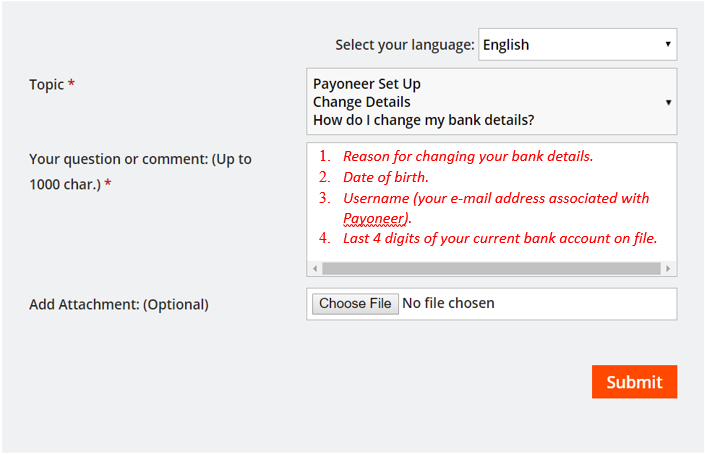
6. Next, to Add Attachment, click on Choose File and attach a copy of a voided check with your new bank details.
If you are not able to provide a voided check, we can also accept an official bank document confirming the complete bank account details.
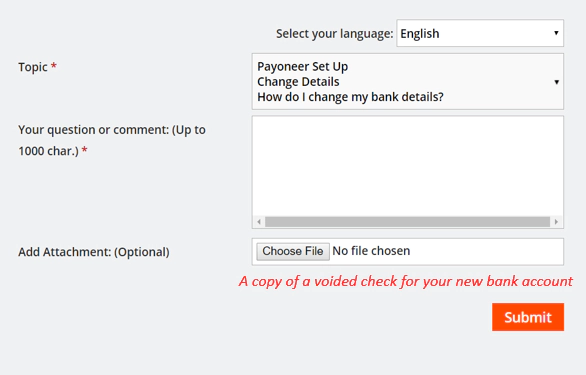
7. Click on Submit.
You should be able to see the updated bank account details in your account within 24 hours. A member of Payoneer’s Customer Care team will contact you in case of any concertns.
To View Your Bank Account
1. Sign in to your Payoneer account.
2. Under Settings, select Bank Accounts.

- View your bank account.
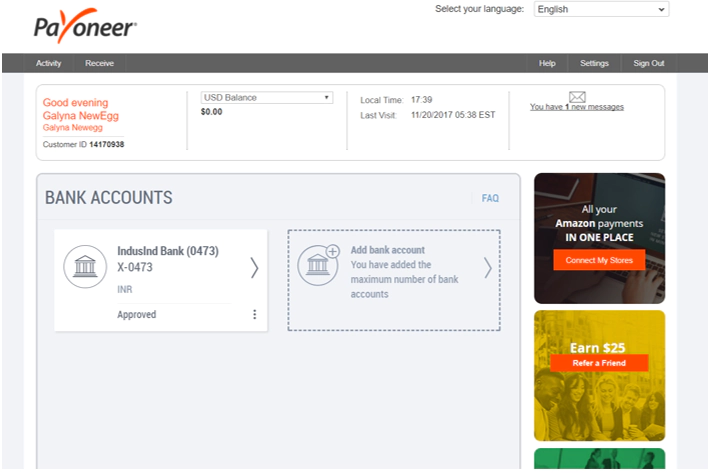
Once you’re ready, exit securely by clicking Sign Out on the menu bar.
Related resources

Discover Your All-In-One Ecommerce Payments Solution
Learn how eCommerce businesses can use Payoneer to receive marketplace payments, pay suppliers, manage multiple currencies, access working capital, and streamline global business payments.


Your Business Payments Are in Good Hands
Learn how to use Payoneer to receive payments from clients and marketplaces, access your funds, pay suppliers, manage currencies, and use additional tools that help simplify global business payments.

Avail the Most Trusted Payment Partner in India
Learn how businesses in India can use Payoneer to receive cross-border payments, withdraw earnings automatically, access Digital FIRCs, pay European VAT, and manage international business payments from one account.

Discover Payoneer’s Services for Your Business
Learn how to make the most of your Payoneer account, from receiving international payments and requesting payments from clients to withdrawing funds, paying suppliers, managing currencies, and accessing additional business…

How to Integrate Payoneer Checkout with Ueeshop
Learn how to integrate Payoneer Checkout with Ueeshop, configure your payment setup, and discover how to accept secure payments while supporting your cross-border ecommerce business.

How to Integrate Payoneer Checkout with WooCommerce
Learn how to integrate Payoneer Checkout with WooCommerce, configure your preferred checkout experience, and start accepting secure online payments through your WordPress store.

How to Integrate Payoneer Checkout with Shoplazza
Learn how to integrate Payoneer Checkout with Shoplazza, set up secure payment acceptance, and discover how a seamless checkout experience can support your online business.

How to Integrate Payoneer Checkout with Shopify
Learn how to integrate Payoneer Checkout with Shopify, set up secure online payments, and discover how a streamlined checkout experience can support your ecommerce growth.

How to Integrate Payoneer Checkout with Shopline
Learn how to integrate Payoneer Checkout with Shopline, set up your payment solution, and discover how it helps you accept secure payments and deliver a better checkout experience for customers.
Latest articles
-

Discover Your All-In-One Ecommerce Payments Solution
Learn how eCommerce businesses can use Payoneer to receive marketplace payments, pay suppliers, manage multiple currencies, access working capital, and streamline global business payments.
-
Your Business Payments Are in Good Hands
Learn how to use Payoneer to receive payments from clients and marketplaces, access your funds, pay suppliers, manage currencies, and use additional tools that help simplify global business payments.
-
Avail the Most Trusted Payment Partner in India
Learn how businesses in India can use Payoneer to receive cross-border payments, withdraw earnings automatically, access Digital FIRCs, pay European VAT, and manage international business payments from one account.
-
Discover Payoneer’s Services for Your Business
Learn how to make the most of your Payoneer account, from receiving international payments and requesting payments from clients to withdrawing funds, paying suppliers, managing currencies, and accessing additional business tools.
-
How to Integrate Payoneer Checkout with Ueeshop
Learn how to integrate Payoneer Checkout with Ueeshop, configure your payment setup, and discover how to accept secure payments while supporting your cross-border ecommerce business.
-
How to Integrate Payoneer Checkout with WooCommerce
Learn how to integrate Payoneer Checkout with WooCommerce, configure your preferred checkout experience, and start accepting secure online payments through your WordPress store.






Disclaimer
The information in this article/on this page is intended for marketing and informational purposes only and does not constitute legal, financial, tax, or professional advice in any context. Payoneer and Payoneer Workforce Management are not liable for the accuracy, completeness or reliability of the information provided herein. Any opinions expressed are those of the individual author and may not reflect the views of Payoneer or Payoneer Workforce Management. All representations and warranties regarding the information presented are disclaimed. The information in this article/on this page reflects the details available at the time of publication. For the most up-to-date information, please consult a Payoneer and/or Payoneer Workforce Management representative or account executive.
Availability of cards and other products is subject to customer’s eligibility. Not all products are available in all jurisdictions in the same manner. Nothing herein should be understood as solicitation outside the jurisdiction where Payoneer Inc. or its affiliates is licensed to engage in payment services, unless permitted by applicable laws. Depending on or your eligibility, you may be offered the Corporate Purchasing Mastercard, issued by First Century Bank, N.A., under a license by Mastercard® and provided to you by Payoneer Inc., or the Payoneer Business Premium Debit Mastercard®, issued and provided from Ireland by Payoneer Europe Limited under a license by Mastercard®.
Skuad Pte Limited (a Payoneer group company) and its affiliates & subsidiaries provide EoR, AoR, and contractor management services.
