
How to pay VAT from your Payoneer balance with no transfer fees!
Editor’s note: The original post was updated on 29.09.21 for accuracy and comprehensiveness. If you’re a cross-border seller selling to customers in the EU and UK, you’ve likely heard about the recent VAT crack-down on foreign Amazon sellers. Sellers reaching a certain threshold in sales to these markets may owe value added tax (VAT) to the…

Editor’s note: The original post was updated on 29.09.21 for accuracy and comprehensiveness.
If you’re a cross-border seller selling to customers in the EU and UK, you’ve likely heard about the recent VAT crack-down on foreign Amazon sellers. Sellers reaching a certain threshold in sales to these markets may owe value added tax (VAT) to the local European governments.
Payoneer has now made it easier than ever for sellers to settle their VAT obligations to the European authorities. Starting December 2017, Payoneer customers can pay their VAT directly from within their account page, with no transfer fees!
Here’s a step-by-step guide to making VAT payments from your Payoneer account.
You can pay your VAT directly by clicking here, or by logging into your Payoneer account. Below are instructions for paying through your account:
- Sign in to your Payoneer account. Under the Pay tab, select Pay Your VAT.
- Under the Pay tab, select Pay Your VAT.

- You will be redirected to the VAT payment platform. Select the country of the VAT authority you would like to pay to.

Don’t see the country you’re looking for? Click on Other countries and search for the country you need. We may not yet support VAT payments for the country you’re looking to pay to.
4. Once you have selected a country, you will be prompted to connect your Payoneer account in order to continue the process. Enter your Payoneer account username and password to proceed.
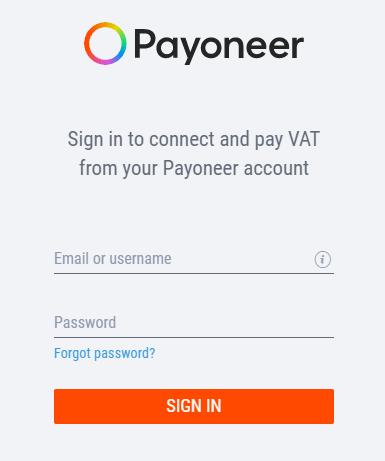
5. Enter the Amount you would like to pay in VAT. Your available Payoneer currency balance will be displayed below.
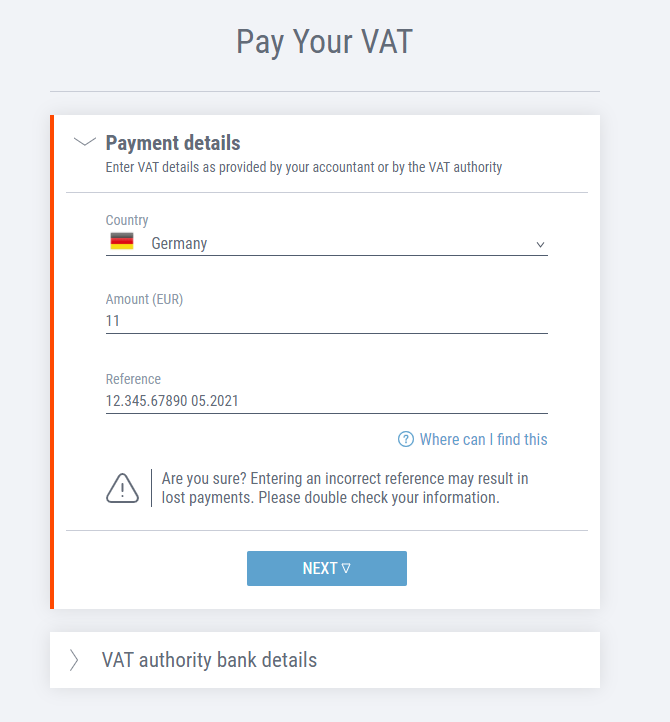
- Enter your VAT registration number. If you aren’t sure where to find this, click on Where can I find this?
* If paying to the UK, Payoneer will automatically provide the VAT authority bank account details for you. This account may be different than the account number you’re familiar with, as it is the HMRC collections account for domestic wire transfers and not international ones (read more here).
** If paying to a different country (not the UK), you will need to provide the Account Number (IBAN) for the government collections account in this country. Once you fill out the IBAN, the Bank Identifier Code (BIC) and Account Name will load automatically.
Here is an example of a payment made to the German VAT authorities:
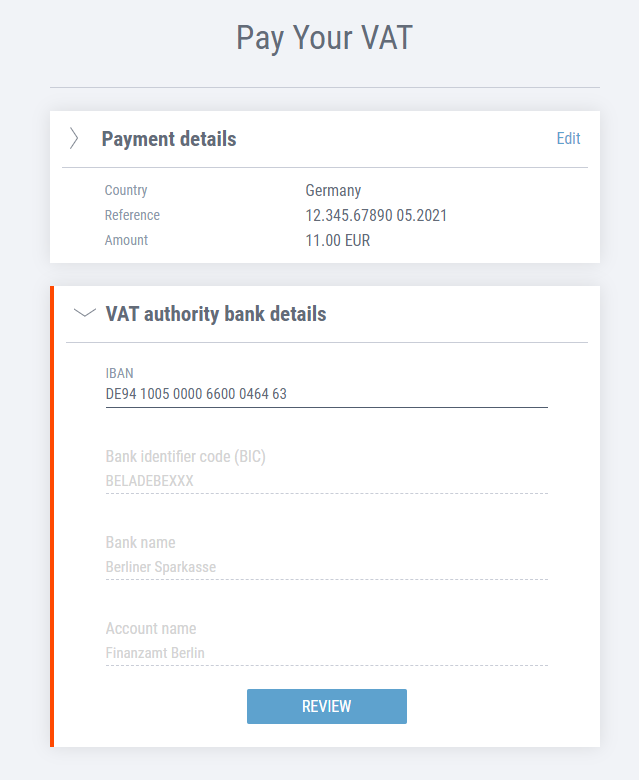
Once the IBAN is entered, the remaining details will be automatically populated.
7. Once done, click on Review.
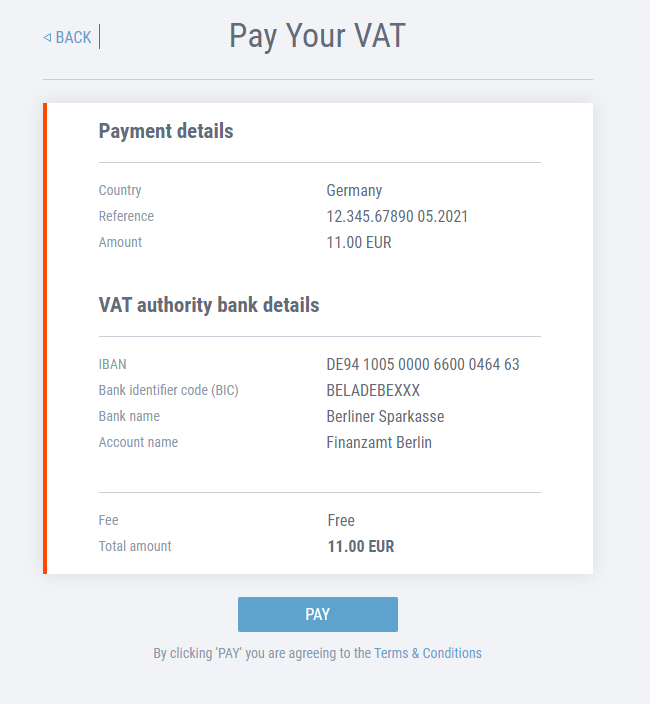
8. Review the VAT payment details before submitting for payment.
9. Once you’ve reviewed the details, if all looks good, click Pay.
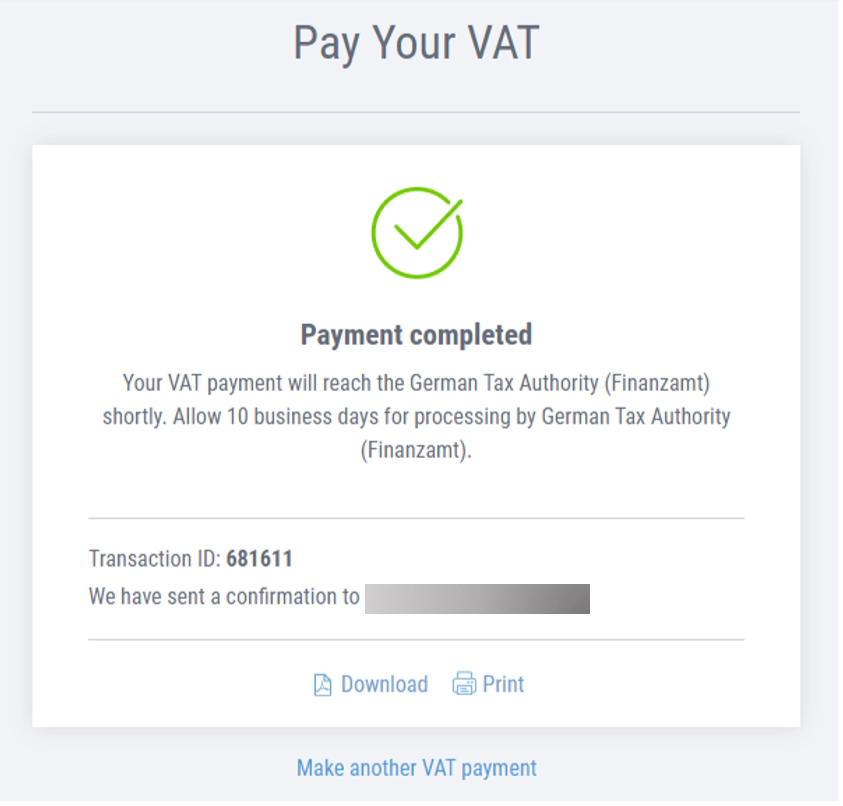
10. That’s it! You will see this authorization screen. Download or Print a summary and confirmation of your VAT payment for your records.
Do you have questions?
Head over to our VAT FAQ and you may find the answer there, or get in touch with Customer Care.
[cta-button text=”Click here to pay your VAT!” url=”https://vat.payoneer.com/?utm_source=blog&utm_medium=referral” color=”#FF4800″ type=”content-download”]
Related resources

VIDEO TEMPLATE GUIDE
SWIFT connects 11,000+ banks worldwide, powering secure international transfers. This guide explains how SWIFT works, why it’s still widely used, how to find your SWIFT code, and how Payoneer helps…


Summary and Quick Answer Example

Payoneer Account: How to open and how much does it cost?
What is it? Payoneer account, what are the types, and why it is beneficial for Ukrainian business. Also learn about taxation and who Payoneer is not suitable for.

Reduce Payoneer Costs: Strategies for Cost Savings
Find out how to withdraw money from Payoneer to Ukraine: an overview of banks, types of accounts, and advice on how to minimize commissions and risks

How to withdraw money from Payoneer to Ukraine
Find out how to withdraw money from Payoneer to Ukraine: an overview of banks, types of accounts, and advice on how to minimize commissions and risks

Guide to payment gateways in Pakistan
Explore major payment gateways in Pakistan to see which one will work for your business. Find out what a gateway is and how to set it up on your website.

Payoneer, SWIFT and ACH Transfers: What’s the Difference?
If you're a Ukrainian freelancer, entrepreneur, or business owner working with international clients, you've likely faced this question: What’s the best way to receive cross-border payments? SWIFT transfers, ACH, and…

The Best Ways to Receive Payment Online as an International Business
International payments don’t have to be slow or expensive. This guide compares methods like SWIFT and ACH, explains common challenges, and shows how Payoneer simplifies global payments with multi-currency accounts…

Best Online Payment Systems for a Small Business
Small businesses need secure, fast ways to accept payments. This guide compares top processors like PayPal, Stripe, Square, and Payoneer, outlining key features, fees, setup steps, and why Payoneer is…
Latest articles
-

One Wallet for Every Marketplace: How Lean Sellers Handle Global Money
Learn how a single multi-currency account can help simplify global payment operations and reduce the admin work that slows growth.
-
How Singapore Corporate Service Providers Can Differentiate in an Increasingly Competitive Market
Incorporation and compliance are no longer enough to stand out. Here’s how leading Corporate Service Providers are evolving their business models—and what it means for the future of the industry.
-
From Incorporation to Operation: What Singapore Corporate Service Providers Need to Help Clients Scale Across Asia
International expansion doesn’t end with company incorporation. Learn how Corporate Service Providers can help businesses build the legal, financial, and operational foundations needed for sustainable cross-border growth.
-
What’s Actually Disrupting Cross-Border Businesses Right Now: Payoneer Global Business Sentiment Survey, Q2 2026
Based on a survey of 8,626 businesses across 20 countries, conducted in May 2026.
-
When to Scale Your VA Business: 5 Signs You’re Ready to Build an Agency in the Philippines
The Philippines has become one of the world’s leading sources of virtual talent. But many Filipino virtual assistants aren’t just building freelance careers anymore — they’re quietly building export businesses. Here’s how to know if you’ve already made the transition.
-
Test: Global money transfers: How to make safe international transactions
In our interconnected world, global money transfers are an essential part of business and personal finance. Whether you’re a small business owner expanding into international markets, a freelancer working with clients abroad, or a consumer purchasing products from another country, understanding how to transact safely on a global scale is crucial.






Disclaimer
The information in this article/on this page is intended for marketing and informational purposes only and does not constitute legal, financial, tax, or professional advice in any context. Payoneer and Payoneer Workforce Management are not liable for the accuracy, completeness or reliability of the information provided herein. Any opinions expressed are those of the individual author and may not reflect the views of Payoneer or Payoneer Workforce Management. All representations and warranties regarding the information presented are disclaimed. The information in this article/on this page reflects the details available at the time of publication. For the most up-to-date information, please consult a Payoneer and/or Payoneer Workforce Management representative or account executive.
Availability of cards and other products is subject to customer’s eligibility. Not all products are available in all jurisdictions in the same manner. Nothing herein should be understood as solicitation outside the jurisdiction where Payoneer Inc. or its affiliates is licensed to engage in payment services, unless permitted by applicable laws. Depending on or your eligibility, you may be offered the Corporate Purchasing Mastercard, issued by First Century Bank, N.A., under a license by Mastercard® and provided to you by Payoneer Inc., or the Payoneer Business Premium Debit Mastercard®, issued and provided from Ireland by Payoneer Europe Limited under a license by Mastercard®.
Skuad Pte Limited (a Payoneer group company) and its affiliates & subsidiaries provide EoR, AoR, and contractor management services.
