
Get Paid Globally: How to Open a Payoneer Individual Account in the Philippines
A complete step-by-step guide for Filipino freelancers, virtual assistants, creators, and sole proprietors to open and verify a Payoneer Individual Account, avoid common mistakes, and start receiving international payments smoothly.

If you’re a Filipino freelancer or virtual assistant working with overseas clients, getting paid shouldn’t be complicated. Payoneer gives you a fast, reliable way to receive international payments.
What is a Payoneer Individual Account?
A Payoneer Individual Account is the right account type for:
- Freelancers and remote workers on platforms like Upwork, Fiverr, or OnlineJobs.ph
- Virtual assistants (VAs) working with foreign clients
- Content creators receiving royalties or ad revenue from global platforms
- DTI-registered sole proprietors
- Independent consultants (designers, developers, writers, consultants)
Individual vs. business: Which one is right for you?
Not sure which account type fits your situation? Here’s a quick comparison:
| FEATURE | INDIVIDUAL ACCOUNT | BUSINESS ACCOUNT |
| Best for | Freelancers, virtual assistants, contractors, and individuals with no registered business. | Registered agencies and SEC-incorporated companies. |
| Registration type | No business registration required. | Corporate entity only (SEC-registered). |
| Sole proprietors (DTI) | ✅ Recommended — DTI sole proprietors apply here. | ❌ Not for sole proprietors. |
| Batch payments | ❌ Not available. | ✅ Send bulk payments to multiple recipients. |
| Multiple users | ❌ One user per account. | ✅ Add multiple users with role-based access. |
| Primary requirement | Valid government-issued photo ID. | Company registration docs (SEC/BIR) + signatory ID. |
| Marketplace earnings | ✅ Upwork, Fiverr, Amazon, and more. | ✅ Consolidate earnings across clients and stores. |
If you have a business entity, refer to this guide instead. Otherwise, keep reading.
With a Payoneer Individual Account, you can:
- Receive payments from 2,000+ global marketplaces and networks, including Upwork, Fiverr, Amazon, eBay, and Adobe
- Hold balances in 70+ currencies
- Withdraw funds to your local PH bank account
- Request payments from international clients via invoice link
What you need before applying
Before you start your registration, make sure you have these ready. All details must match your government-issued ID exactly.
1. Personal identification (visual verification)
Most recommended:
- Philippine National ID / PhilSys ID (physical PVC card only — digital version not accepted; both sides required if information is on both sides)
- Passport (must include MRZ code)
- Driver’s License (physical PVC card only — digital version not accepted; both sides required)
Also accepted (all valid for identity verification; both sides required if information is on both sides):
- UMID (Unified Multi-Purpose ID)
- Postal ID
- Voter’s ID
- OFW / OWWA (Overseas Workers Welfare Association) ID
- Seaman’s Book / MARINA ID
- Alien Certificate of Registration
Not accepted:
- Barangay Residence Cards, Police Clearance, Student IDs, Disability Cards
2. Proof of Residence (POR)
Must show your full name and exact address you enter during registration. Choose one:
- A government‑issued ID (different type from your photo verification ID) is sufficient.
- A bank statement issued within 6 months, with your name, address, and bank logo
- A utility bill (water, cable, gas, electricity, internet, TV, landline) issued within 6 months in your name
- A signed rental agreement
- Barangay certificate
Note: For account holders still living with their parents with no bills under their name, the best option is barangay certificate. Otherwise, they can submit utility bill in parent’s name with a supporting birth certificate to prove relationship. Additionally, delivery receipts are not accepted as proof of residence.
3. SSS number
Have your Social Security System (SSS) number ready exactly as it appears on your SSS card or official records.
4. Philippine Bank Account
A local bank account for withdrawals. The account holder name must exactly match your Payoneer registration name.
Step-by-step registration process
Step 1: Choose your account type
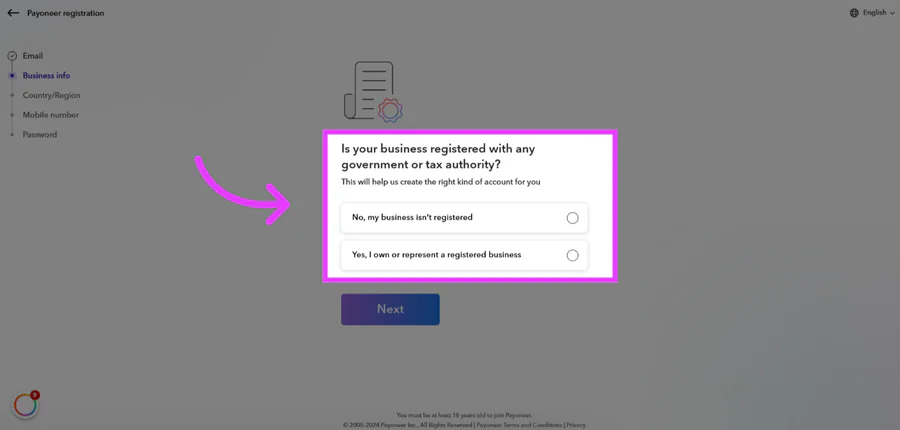
Register Here. When asked whether your business is registered with a government or tax authority, select “No, my business isn’t registered” to begin the Individual account flow.
Step 2: Tell us about your activity
Payoneer will ask a few questions to understand what you do and what payment tools to set up for you. Click “Let’s go!” to start.
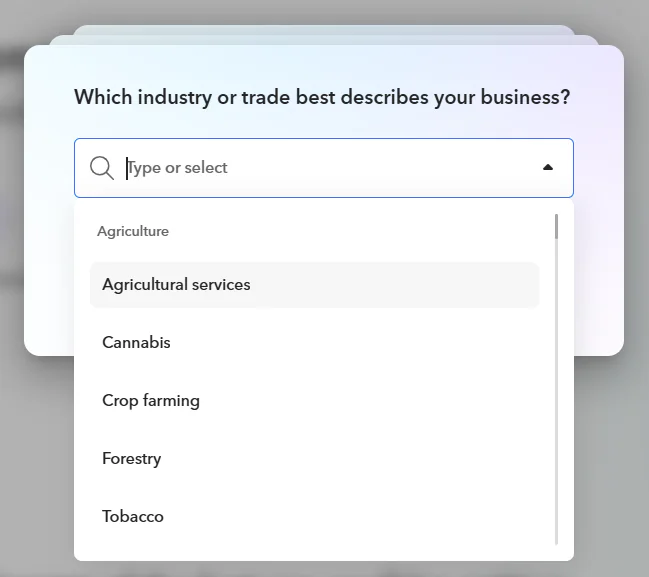
- Select the industry or trade that best describes what you do. If you are a Virtual Assistant or freelancer offering remote professional services, select “Professional Services.”
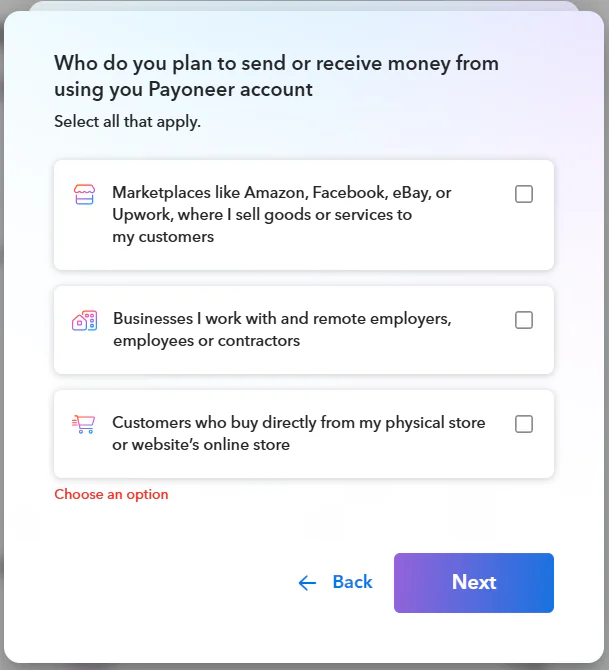
- Select who you send or receive money from:
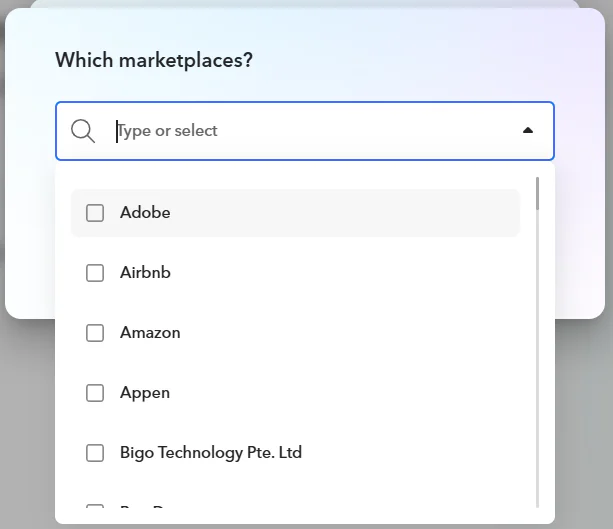
- If you work on specific marketplaces, select them here:
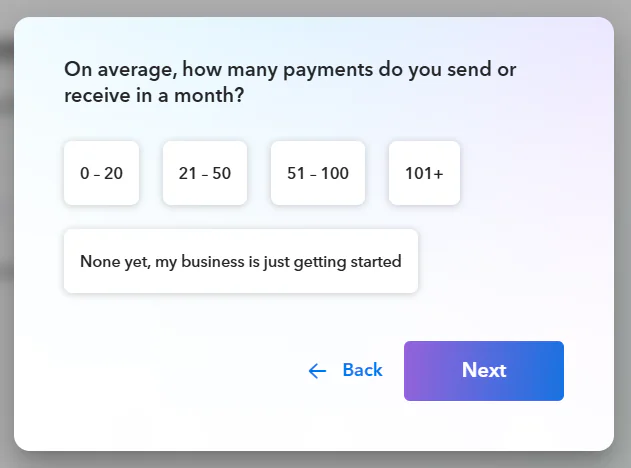
- Estimate how many payments you send or receive per month:
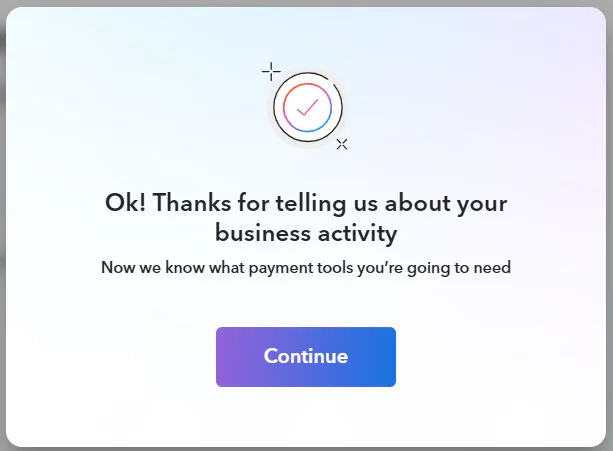
- Once your activity is confirmed, click Continue to proceed.
Step 3: Complete your information and documents
You’ll see a progress tracker showing the full process: Registration → Info and documents → Verification → First transaction.
Step 4: Online presence (website or social profile)
Provide a URL for your online presence. Use a personal URL such as your LinkedIn profile or Facebook page. Generic or business website URLs may cause issues during verification. Do not leave this blank. Submitting without a URL may disqualify your application.
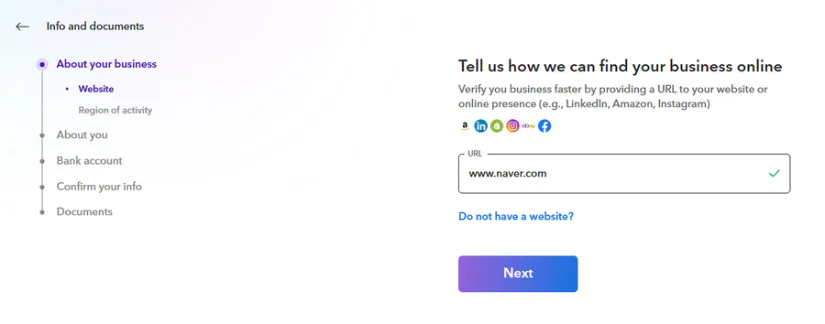
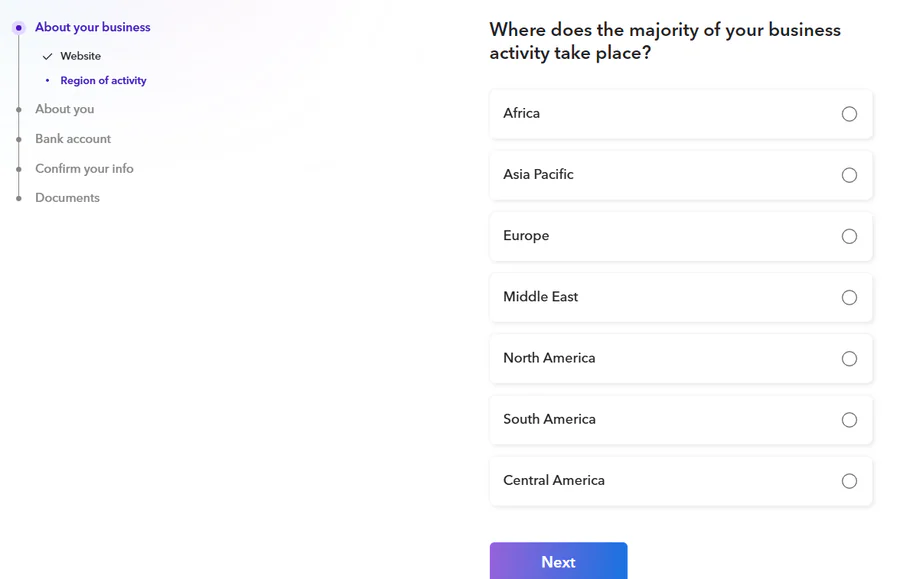
You’ll also be asked where most of your business activity takes place. Select the region where most of your clients or earnings come from:
Step 5: Personal information
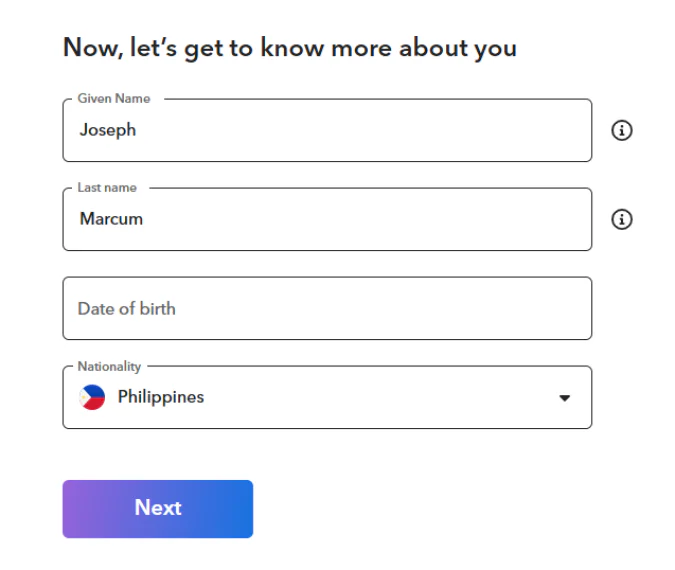
Enter your full legal name and date of birth exactly as they appear on your government-issued ID. Payoneer does not accept nicknames, informal names, or shortened versions.
Step 6: Residential address
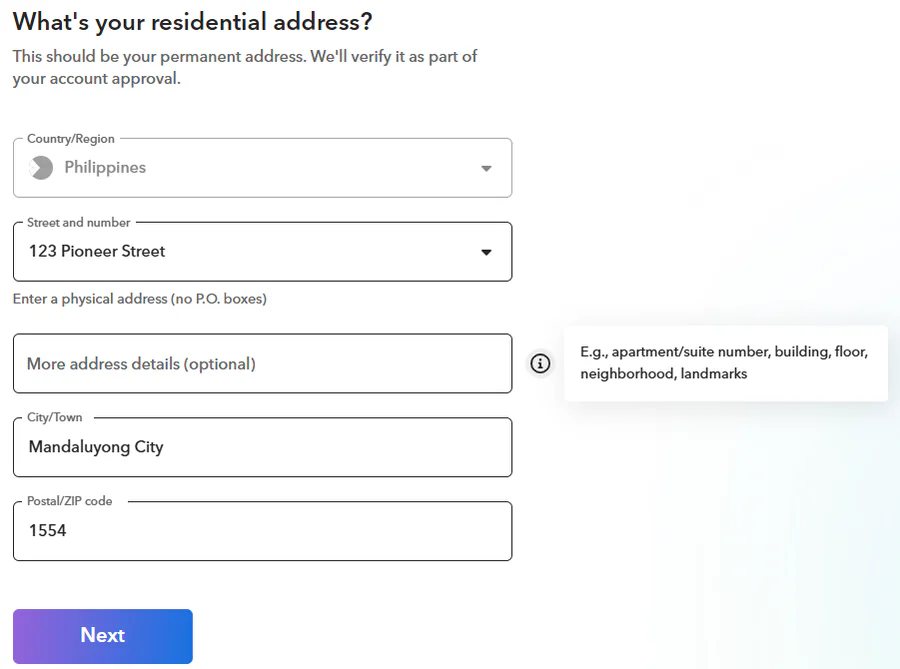
Enter your full private residential address. This is critical! Your Proof of Address document must show this exact address. P.O. boxes are not accepted.
Step 7: SSS number
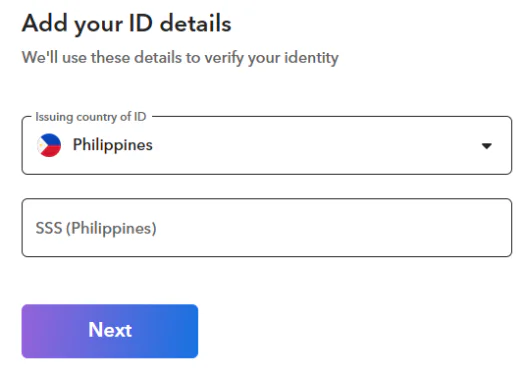
Enter your SSS number exactly as it appears on your SSS card or records. It is required for identity verification in the Philippines. Double-check every digit — errors here are one of the most common causes of delays.
Step 8: Bank account connection
Link the Philippine bank account you’ll use for withdrawals. Select Personal (not Business) and choose your bank currency.
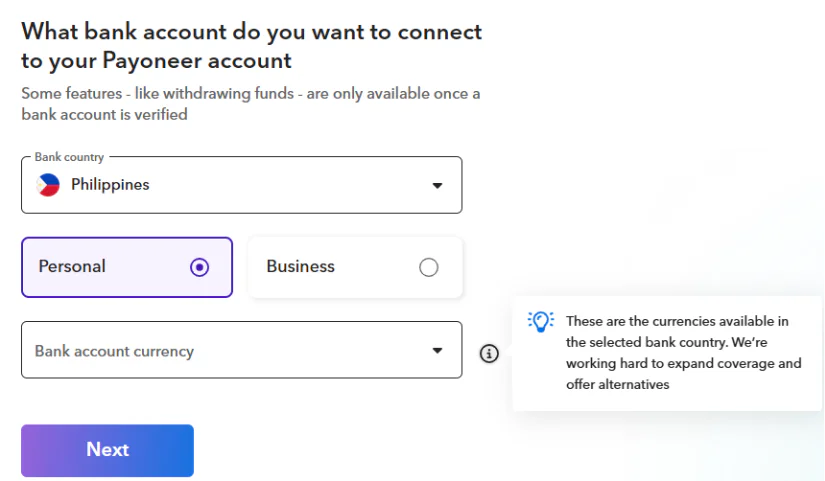
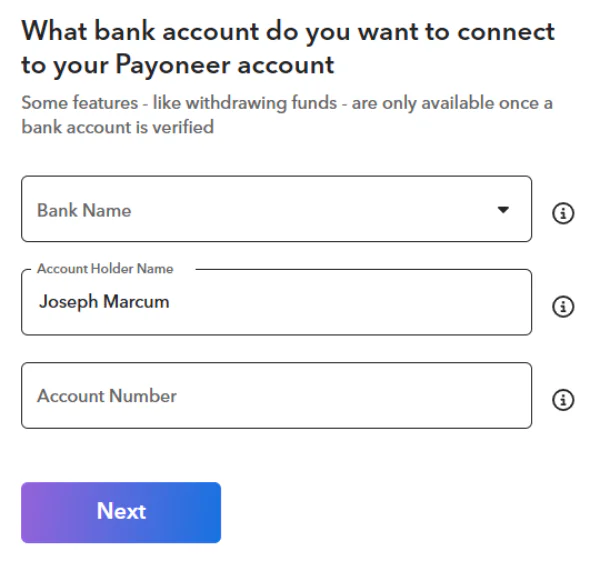
Enter your bank name, account holder name, and account number. The account holder name must match your Payoneer registration name exactly.
Important: You must link your own personal bank account. Accounts registered under a partner’s, parent’s, or any other person’s name will not be accepted.
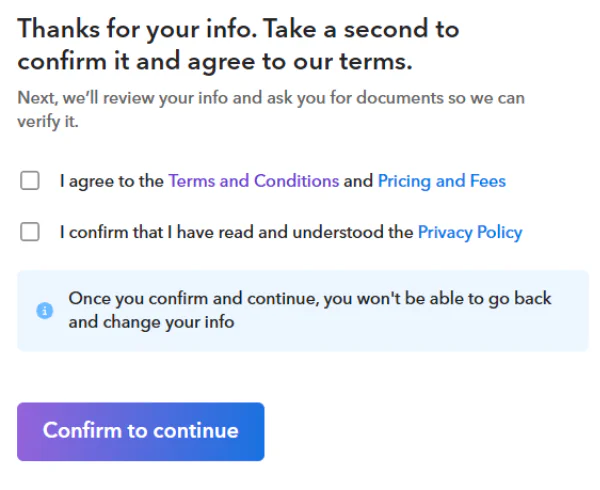
Step 9: Confirm your info and agree to terms
Review all the information you’ve provided, agree to the Terms and Conditions and Privacy Policy, and click Confirm to continue. You won’t be able to edit your info after this step.
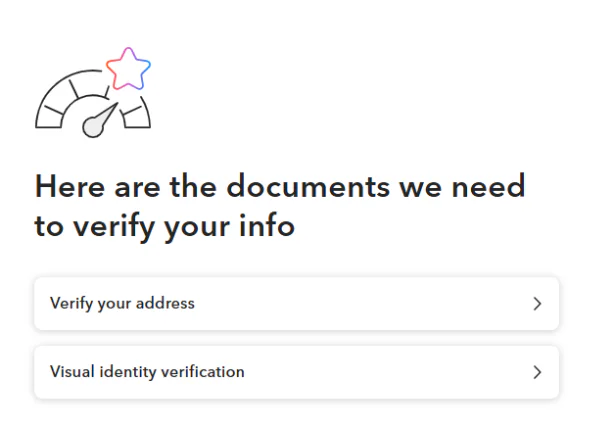
Step 10: Submit your verification documents
After confirming, you’ll be shown which documents Payoneer needs to verify your account. For most PH applicants, this includes Proof of Address and Visual Identity Verification.
For Proof of Address, upload the document that shows your name and the exact address you registered with:
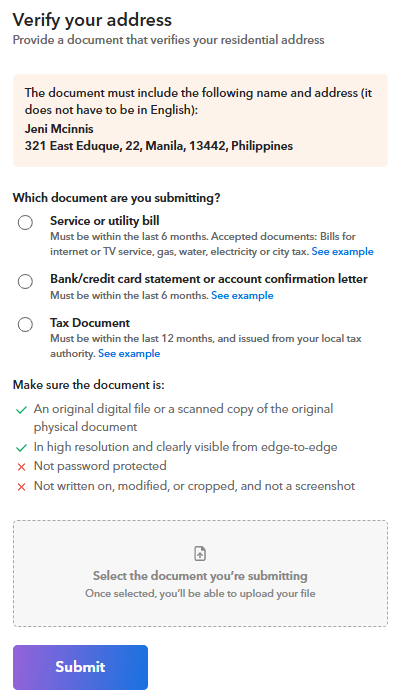
Step 11: Visual identity verification (photo ID + selfie)
The final step is verifying your identity with a government-issued photo ID and a live selfie. Prepare your ID before starting.
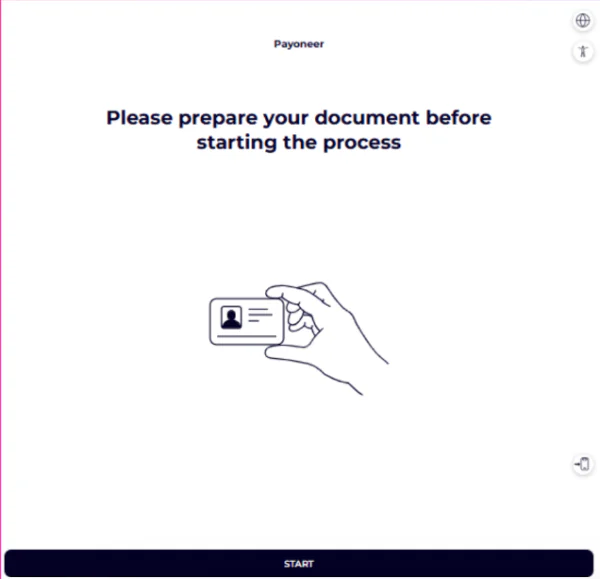
Payoneer recommends completing this step on your mobile device for easier selfie capture. Scan the QR code with your phone camera to switch.
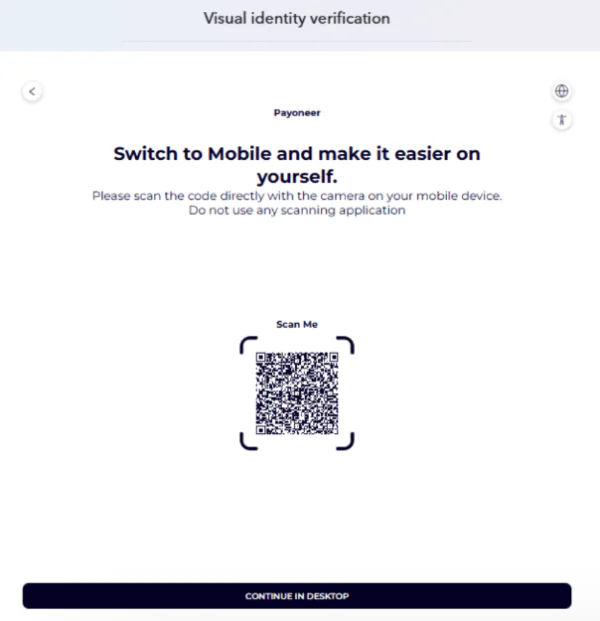
Your ID photo must be:
- In full color (no black and white)
- Clear and readable — no blurry text or glare
- Showing all four corners of the document
- Matching the exact name and details you entered during registration
After you apply: What to expect
- Review timeline: Applications are usually reviewed within 3 business days after all documents are submitted.
- Requirement center: After confirming your info, you will be directed to the Requirement Center. All documents and questionnaires listed there are required — do not skip any step. To access it at any time, log in to your Payoneer account, go to Settings, and select “Requirement Center.” If you do not have a registered business but are asked to fill out a business questionnaire, describe the services you offer (e.g., Virtual assistant services, admin support, and data entry for international clients).
- Notifications: You’ll receive an email once approved. Check your spam/junk folder if you don’t see it.
- One account only: Each person can only have one Payoneer account. Duplicate registrations are automatically rejected.
Already have an account? Log in and use the Requirement Center to complete all pending steps. Do not create a new account — it will be rejected automatically.
What happens if your application is rejected?
Don’t panic — most rejections are fixable. Common reasons include:
- Blurry, cropped, or black-and-white ID photo
- Name mismatch between your ID, registration details, and bank account
- Expired ID submitted
- Proof of Address document not matching the registered address exactly
- SSS number entered incorrectly
What to do: Check your Payoneer email for the specific reason. Log in to your account and go to the Requirement Center to resubmit the correct documents. If you’re unsure, contact Payoneer Support at payoneer.com/support for assistance.
Common mistakes to avoid
These are the most frequent reasons Filipino applicants get delayed or rejected:
- Using a digital or e-ID — only physical PVC cards are accepted for identity verification
- Submitting an SSS Card without a birthdate. New SSS card formats that don’t show your date of birth will be declined
- Name mismatch: your full legal name must be identical across your Payoneer registration, your ID, and your bank account
- Linking a family member’s bank account. Only your own personal bank account is accepted
- Leaving the URL field blank. No online presence may limit your eligibility for certain account features
- Submitting a P.O. box as your address, it must be a physical residential address
- Skipping the Requirement Center. All documents and questionnaires listed there are mandatory
Frequently asked questions (FAQs)
Opening and maintaining a Payoneer account is free, subject to active use. There is an annual fee of $29.95 if you receive less than 6,000.00 USD (or equivalent) in any consecutive 12-month period. There are standard fees for withdrawals and currency conversion. See the full breakdown at https://www.payoneer.com/about/fees/.
Most applications are reviewed within 1–3 business days after all documents are submitted. If additional documents are needed, it may take up to 5–7 business days.
No — only one Payoneer account per person is allowed. You can create multiple currency sub-accounts within a single account to manage different currencies.
Yes, it will. The name on your Payoneer account must match your bank account holder name exactly — including middle name if listed. Confirm the exact name on your bank account before registering.
You must be at least 18 years old to register for a Payoneer account.
Expired IDs will not be accepted. Make sure your government-issued ID is valid and unexpired at the time of submission. If your ID is expired, renew it before applying.
Related resources

The False Economy of Staying Solo: What $10K a Month Really Costs a Virtual Assistant Business
The systems that got you to five figures are quietly taxing every dollar after it.


How Singapore Corporate Service Providers Can Differentiate in an Increasingly Competitive Market
Incorporation and compliance are no longer enough to stand out. Here's how leading Corporate Service Providers are evolving their business models—and what it means for the future of the industry.

From Incorporation to Operation: What Singapore Corporate Service Providers Need to Help Clients Scale Across Asia
International expansion doesn't end with company incorporation. Learn how Corporate Service Providers can help businesses build the legal, financial, and operational foundations needed for sustainable cross-border growth.

When to Scale Your VA Business: 5 Signs You’re Ready to Build an Agency in the Philippines
The Philippines has become one of the world's leading sources of virtual talent. But many Filipino virtual assistants aren't just building freelance careers anymore — they're quietly building export businesses.…

Enabling Singapore-Based Businesses to Structure and Scale Across ASEAN: A Guide for Corporate Service Providers
Learn how corporate service providers can help Singapore-based businesses structure, manage and scale their ASEAN operations through effective entity design, financial infrastructure planning and regional compliance frameworks.

Cross-Border Expansion Trends and What They Mean for Corporate Service Providers
As client expansion strategies evolve, corporate service providers must adapt. Explore the key cross-border expansion trends shaping demand for regional structuring, compliance, governance and financial infrastructure support.

How to Open a Payoneer Company Account in Pakistan: A Step-by-Step Guide
A complete guide for SECP-registered companies, partnerships, and sole proprietors in Pakistan to navigate registration requirements, document preparation, and account verification.

How to Open a Payoneer Individual Account in Pakistan: A Step-by-Step Guide
A complete guide for freelancers and individuals in Pakistan to navigate registration requirements, document preparation, and account verification.

How to Withdraw Your Payoneer Earnings to Your Local Bank Account in the Philippines
Learn how to withdraw Payoneer funds to your Philippine bank account, set up scheduled withdrawals, and manage your income with greater flexibility.
Latest articles
-

Discover Your All-In-One Ecommerce Payments Solution
Learn how eCommerce businesses can use Payoneer to receive marketplace payments, pay suppliers, manage multiple currencies, access working capital, and streamline global business payments.
-
Your Business Payments Are in Good Hands
Learn how to use Payoneer to receive payments from clients and marketplaces, access your funds, pay suppliers, manage currencies, and use additional tools that help simplify global business payments.
-
Avail the Most Trusted Payment Partner in India
Learn how businesses in India can use Payoneer to receive cross-border payments, withdraw earnings automatically, access Digital FIRCs, pay European VAT, and manage international business payments from one account.
-
Discover Payoneer’s Services for Your Business
Learn how to make the most of your Payoneer account, from receiving international payments and requesting payments from clients to withdrawing funds, paying suppliers, managing currencies, and accessing additional business tools.
-
How to Integrate Payoneer Checkout with Ueeshop
Learn how to integrate Payoneer Checkout with Ueeshop, configure your payment setup, and discover how to accept secure payments while supporting your cross-border ecommerce business.
-
How to Integrate Payoneer Checkout with WooCommerce
Learn how to integrate Payoneer Checkout with WooCommerce, configure your preferred checkout experience, and start accepting secure online payments through your WordPress store.






Disclaimer
The information in this article/on this page is intended for marketing and informational purposes only and does not constitute legal, financial, tax, or professional advice in any context. Payoneer and Payoneer Workforce Management are not liable for the accuracy, completeness or reliability of the information provided herein. Any opinions expressed are those of the individual author and may not reflect the views of Payoneer or Payoneer Workforce Management. All representations and warranties regarding the information presented are disclaimed. The information in this article/on this page reflects the details available at the time of publication. For the most up-to-date information, please consult a Payoneer and/or Payoneer Workforce Management representative or account executive.
Availability of cards and other products is subject to customer’s eligibility. Not all products are available in all jurisdictions in the same manner. Nothing herein should be understood as solicitation outside the jurisdiction where Payoneer Inc. or its affiliates is licensed to engage in payment services, unless permitted by applicable laws. Depending on or your eligibility, you may be offered the Corporate Purchasing Mastercard, issued by First Century Bank, N.A., under a license by Mastercard® and provided to you by Payoneer Inc., or the Payoneer Business Premium Debit Mastercard®, issued and provided from Ireland by Payoneer Europe Limited under a license by Mastercard®.
Skuad Pte Limited (a Payoneer group company) and its affiliates & subsidiaries provide EoR, AoR, and contractor management services.
