
6 Tips for Keeping your Payoneer Card Safe While Abroad
One of the best things about being a digital nomad is that you get the freedom to combine work and travel. Payoneer makes it even easier because your Payoneer card works like a regular debit card in hundreds of countries worldwide. You can use it to get the funds you need while traveling, without paying…


One of the best things about being a digital nomad is that you get the freedom to combine work and travel. Payoneer makes it even easier because your Payoneer card works like a regular debit card in hundreds of countries worldwide. You can use it to get the funds you need while traveling, without paying expensive foreign exchange rates. Here are some tips for smooth travels with your Payoneer card.
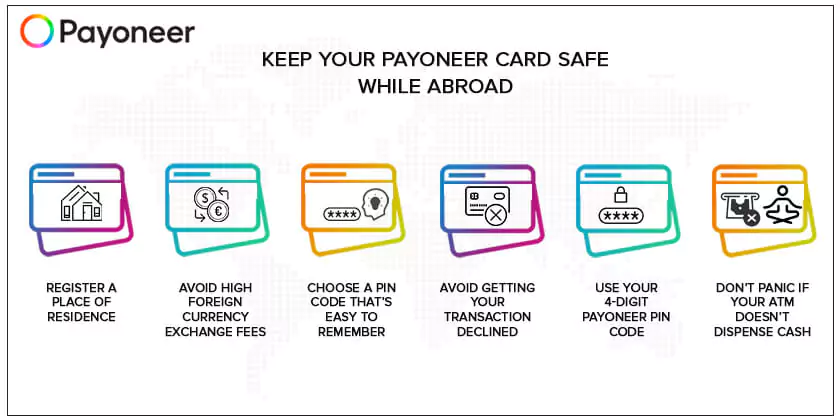
1. Register a Place of Residence
If your Payoneer card gets lost, stolen, or chewed up by the ATM while you’re traveling, all is not lost. You can order a new Payoneer card to replace it, and we’ll send it to you ASAP.
There’s just one thing – we can only send your new card to a registered address. For example, if you’re traveling in Thailand, we can’t send the card to your hostel, but only to your registered billing address.
Note: We cannot change the address once the card has already shipped. We only ship cards to a registered address under your name and not to anyone else.
If you need to report a lost or stolen Payoneer card, please reach out to us ASAP, so that we can ensure that no one else can access your hard-earned funds.
2. Avoid High Foreign Currency Exchange Fees
Using your Payoneer card while you travel is a great way to pay less in foreign exchange fees. The Payoneer conversion fee is a fee of up to 3.5%, so you’ll never have to struggle to understand complicated fee agreements or get a nasty surprise when you find out how much money you lost in the conversion.
Payoneer is always transparent about the exchange rate, too. Before you agree to the transfer, you’ll see the exact exchange rate and how much you’ll get after the transfer. If you don’t like the rate, you don’t have to go through with the exchange.
Note: You can only access the balance that corresponds with the card’s currency. For example, if you switch from USD to GBP currencies and you don’t have a GBP card, those funds are not accessible with your USD card. The funds will need to be converted back to USD or withdrawn via the “Withdraw to Bank” service.
Below are a few steps for converting money through Payoneer:
- Sign in to your Payoneer account and click Manage Currencies.
- Choose the relevant balances and enter the amount that you wish to transfer or receive.
- Click on Get Rate to calculate the transfer amount based on the current market rate, including our fee.
- Click on SUBMIT to transfer the funds between your balances and receive your requested currency.
3. Choose a PIN Code That’s Easy For You to Remember
You need your PIN code to withdraw money at an ATM or use your Payoneer card for purchases, so it’s very important to remember it. Choose a PIN code that’s easy for you to remember, but difficult for anyone else to guess (1234 is not a secure PIN code! Nor is your birth date).
If you forget your PIN code, you can reset it, but you’ll need to contact a Payoneer customer service representative through Live Chat, or Call Us, and then reset the PIN code through your online account within 30 minutes of your call/chat.
4. Avoid Getting Your Transaction Declined
It’s very frustrating when trying to withdraw funds or make purchases, and then have your transaction declined. Here’s how to avoid it:
- Make sure that you have enough funds for the purchase, including any fees.
- Check to see whether your card has expired.
- Enter the correct billing address and other card information, including the CVV number when trying to make an online purchase.
If your transaction is declined in a store or at an ATM, but you’re sure that you have enough money on the card, please contact Payoneer to get more help.
5. Use Your 4-digit Payoneer PIN Code
Sometimes, an ATM asks you to enter your 6-digit code in order to withdraw your money. Don’t worry – just enter your 4-digit PIN code instead and the system should accept it.
6. Don’t Panic if Your ATM Doesn’t Dispense Cash
Every now and then, you might use an ATM that charges you a fee but doesn’t pay out your cash. When that happens, the ATM automatically reverses the charges and refunds the fee within 5 business days. It’s best to wait patiently for that to take place.
If the ATM still doesn’t refund you after 5 business days, contact Payoneer so that we can help you to file a dispute and get back your funds. However, please note that in some cases, your funds could possibly be held up for longer.
You’ll need the following information to file a dispute:
- Transaction ID – this can be found by logging in to your online Payoneer account and locating the transaction in your “Activity” tab.
- Transaction date
- Name of the merchant
- Transaction amount
Payoneer Makes Travel More Fun
With your Payoneer card, you can cross the world as often as you like, without worrying about high foreign currency exchange fees or payment processes that aren’t secure. Use these tips to travel further and enjoy more with Payoneer.
Related resources

What Is Treasury Management and How It Works
Explore treasury management: the functions, systems, and best practices for managing business cash flow, liquidity, and risk‑for corporate treasuries and SMBs alike.


How to Manage Your Accounts Payable for International Contractors
Learn how to efficiently manage accounts payable for international contractors. Discover best practices for cross-border payments, compliance, automation, and global cash flow control.

Payment Confirmation Guide: How to Know Your Money Arrived Safely
Learn how to confirm your payment was received, track its status, and understand typical processing times with Payoneer’s international payment tools.

Wire Transfer in Ukraine: What Businesses Need to Know
Wire transfer in Ukraine for business, complete guide: how to make a transfer and receive an international Wire transfer on the account, terms and fees, tips, and examples.

Swift, ACH, or Wire: Which International Payment Method Should Businesses Choose?
SWIFT, ACH, or Wire for Ukrainian business: how they work, how they differ, which is cheaper and faster.
How global businesses use the Payoneer card to accelerate their growth
Discover the smart way to streamline your businesses expenses, exploit your growth opportunities, and maintain ultimate financial control with the all-new Payoneer card.

Accounts Receivable Best Practices for Global Service Providers
It doesn’t matter how profitable your business is, if you don’t have a healthy cash flow to finance your day-to-day operations, you’re going to run into trouble. Managing your accounts…

A Comprehensive Guide to Cross-border Payments
Outsourcing is a great way to grow your business. But the relationship depends on smooth, secure, on time payments. You also need to pay using local currency and payment methods.…

Online Payment Methods for Businesses in Pakistan
As businesses in Pakistan grow locally and globally, the need for reliable online payment solutions is increasing. Whether you're a freelancer working with international clients or a merchant selling to…
Latest articles
-

US vs Europe Employment Costs and Net Pay Compared: 2026 Study
How much does it really cost to hire in Europe versus the US? Explore a data-backed comparison of statutory employer costs, local salaries, and net pay across 12 leading cities.
-
Enabling Singapore-Based Businesses to Structure and Scale Across ASEAN: A Guide for Corporate Service Providers
Learn how corporate service providers can help Singapore-based businesses structure, manage and scale their ASEAN operations through effective entity design, financial infrastructure planning and regional compliance frameworks.
-
Cross-Border Expansion Trends and What They Mean for Corporate Service Providers
As client expansion strategies evolve, corporate service providers must adapt. Explore the key cross-border expansion trends shaping demand for regional structuring, compliance, governance and financial infrastructure support.
-
Voice Search Optimization for Global Businesses: Preparing for the Future of Financial SEO
Learn how financial services can optimize for voice search and AI‑driven search assistants. Explore strategies to stay ahead in a voice‑first world.
-
What Is a Virtual Business Bank Account?
Learn what a virtual business bank account is, how it works, and why modern businesses rely on digital accounts for faster, global payments.
-
The Role of Social Proof: How to Boosts Payment Platform Credibility
Learn how social proof such as testimonials, reviews and user‑stories enhances credibility for online payment platforms. Discover strategies for fintechs and payments businesses.






Disclaimer
The information in this article/on this page is intended for marketing and informational purposes only and does not constitute legal, financial, tax, or professional advice in any context. Payoneer and Payoneer Workforce Management are not liable for the accuracy, completeness or reliability of the information provided herein. Any opinions expressed are those of the individual author and may not reflect the views of Payoneer or Payoneer Workforce Management. All representations and warranties regarding the information presented are disclaimed. The information in this article/on this page reflects the details available at the time of publication. For the most up-to-date information, please consult a Payoneer and/or Payoneer Workforce Management representative or account executive.
Availability of cards and other products is subject to customer’s eligibility. Not all products are available in all jurisdictions in the same manner. Nothing herein should be understood as solicitation outside the jurisdiction where Payoneer Inc. or its affiliates is licensed to engage in payment services, unless permitted by applicable laws. Depending on or your eligibility, you may be offered the Corporate Purchasing Mastercard, issued by First Century Bank, N.A., under a license by Mastercard® and provided to you by Payoneer Inc., or the Payoneer Business Premium Debit Mastercard®, issued and provided from Ireland by Payoneer Europe Limited under a license by Mastercard®.
Skuad Pte Limited (a Payoneer group company) and its affiliates & subsidiaries provide EoR, AoR, and contractor management services.
