
The perfect invoice builder for small business owners
Use our invoice builder to create professional PDF invoices for your ecommerce business easily Introducing Payoneer’s free invoice builder – the hassle-free solution for small businesses. Easily create professional invoices with your customized logo, track payments, and receive payments online. Our user-friendly interface makes it easy to add client and payment details and save customized…


Use our invoice builder to create professional PDF invoices for your ecommerce business easily
Introducing Payoneer’s free invoice builder – the hassle-free solution for small businesses. Easily create professional invoices with your customized logo, track payments, and receive payments online. Our user-friendly interface makes it easy to add client and payment details and save customized invoice templates for recurring invoices. Plus, with our online invoice builder, you can generate unlimited invoices and download them as PDFs for free. Say goodbye to tedious invoicing and hello to streamlined finances with our free invoice builder.
For small businesses, generating invoices manually can be a time-consuming and daunting task. From creating a professional-looking invoice with all the necessary details to keeping track of payments, invoicing can be a challenge. It’s not uncommon for invoices to be overlooked or lost in the shuffle, leading to delayed payments and frustrated clients. With our free invoice builder, small business owners can eliminate these challenges and streamline their invoicing process, making it easier to get paid on time and keep their business running smoothly.
Get paid faster with our free invoice online service
Say goodbye to the stress and hassle of invoicing with Payoneer’s free invoice online service. Our innovative invoice generator allows you to easily create and customize professional invoices with your logo, essential details, and payment terms. No more waiting weeks or even months to get paid by clients – with the ability to generate unlimited invoices and download them as PDFs, you can streamline your invoicing process and get paid faster than ever before.
Invoicing is a crucial part of the sales and order completion process for any business, and it can have a significant impact on the relationship with your clients. Sending professional and accurate invoices can create a good impression and build trust with clients, while poorly managed invoicing can lead to late or missed payments, causing frustration and potentially damaging your business reputation.
That’s why we’re proud to offer our free invoice online service, providing small business owners with an easy and efficient way to create customized, professional invoices. Our user-friendly interface and customizable templates make it easy to add essential details like payment terms, banking information, and your company logo.
Plus, with the ability to generate unlimited invoices and download them as PDFs, managing your invoicing process has never been easier. Keep track of all your invoices and client details with ease, and never miss a payment again.
Take control of your small business finances and impress your clients with professional and accurate invoicing using our Free Invoice Builder.
Don’t let invoicing mistakes harm your business reputation – sign up today and experience the convenience and simplicity of Payoneer’s free invoice online service. Say hello to hassle-free invoicing and more cash flow for your business.
Tailored online invoices for free
As a small business owner, it’s important to have an efficient and streamlined invoicing process that ensures timely payments and accurate record-keeping. That’s where our free invoice online service comes in – our innovative platform allows you to create customized invoices that cater to your unique business needs.
From personalizing your invoices with your business logo to itemizing them based on hourly rates or quantity and localizing them with adjustable tax rates and currencies, our tailored features make invoicing a breeze. Plus, with our cloud-based system and easy-to-use management tabs, you can easily access your invoices and client details from anywhere, anytime.
- Customize your invoices with your business logo to create a more professional and branded look.
- Itemize your invoices based on hourly rates or quantity for maximum transparency and flexibility, ensuring that your clients understand every detail of the invoice.
- Localize your invoices with adjustable tax rates and currencies to cater to your global clients, making it easier for them to understand the costs and taxes involved.
- Archive past invoices and manage your client list with ease while storing and updating your details for future invoices in convenient management tabs, keeping your invoicing process organized and streamlined.
- Easily add payment terms and options, including payment links and banking details, to ensure timely and secure payment from your clients, providing them with a variety of options to pay and avoiding any delays.
- Streamline invoicing for recurring payments with customizable invoice templates and automatic payment reminders, freeing up your time to focus on growing your business and avoiding the hassle of manually creating invoices every time.
- Access your invoices and client details from anywhere, anytime, with our cloud-based system so you never miss a payment or opportunity, allowing you to manage your invoicing process on the go and stay on top of your business finances.
- Enjoy top-notch customer support and resources to help you make the most of our free invoice online service because we’re here to help you succeed and grow your business.
Here’s how the free invoice builder works:
- Log in to Payoneer and navigate to Get Paid >> Request a Payment.
- Complete Payment Details with ease using our intuitive interface.
- Attach a professional invoice to your payment request with just one click.
- Send your request and get paid faster with hassle-free invoicing.
To create professional invoices, access our online invoice generator, a free service that lets you quickly and easily create customized PDF invoices. It’s a hassle-free service that instantly generates a professional invoice for your customers
After customizing your invoice to your liking, you can easily save and download it as a professional PDF file.Our free invoice generator tool allows you to access and download your invoices without any additional cost or hidden fees.Simply sign up for this service, and you can enjoy unlimited invoice creation and downloads at your convenience.
Under the payment details section, select Upload Files and then attach your newly created invoice to your payment request.
That’s how easy it is! Most of the time, when you create invoice online files, the files are usually saved to your computer’s downloads folder.
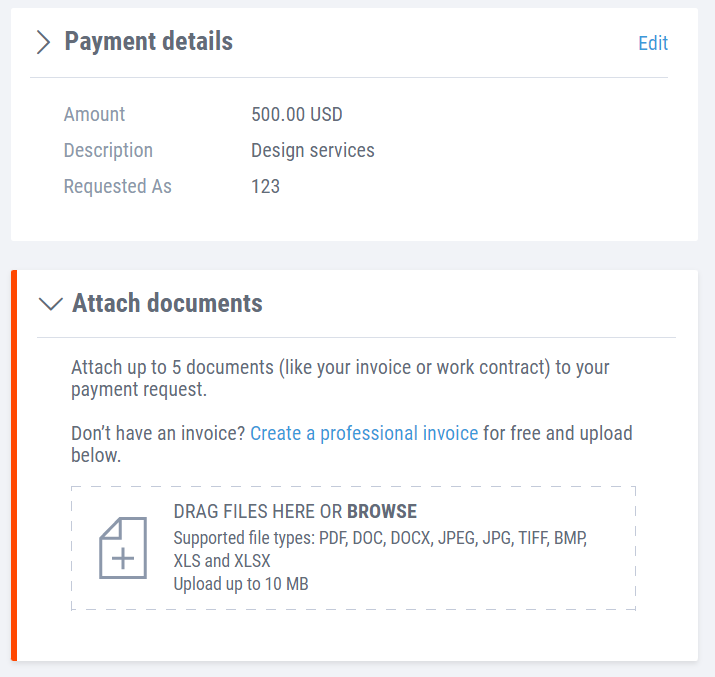
Now you can send your payment request with a professional PDF invoice.
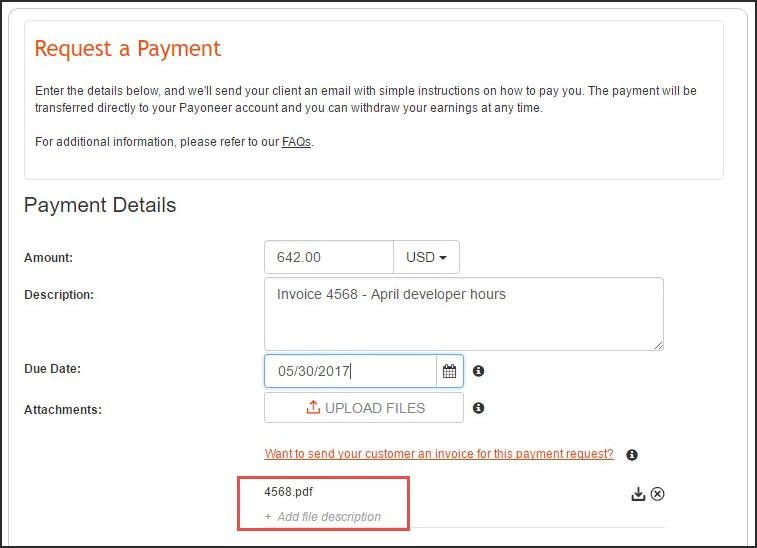
Congratulations! You’re now equipped with the knowledge and tools to create professional invoices and streamline your invoicing process with Payoneer’s free invoice builder. Say goodbye to the hassle of invoicing and hello to more cash flow and happy clients.
Extra tips and best practices for using our free invoice builder
Here are some additional tips and best practices for using Payoneer’s free invoice builder effectively:
- Customize your invoice template: You can customize the invoice builder template to match your brand identity by adding your company logo. This will create a professional and consistent look across all your invoices.
- Use clear and concise descriptions: When itemizing your invoices, use simple and descriptive language to ensure that your clients understand what they’re paying for. Avoid using jargon or technical terms that may confuse them.
- Always establish clear payment terms: Specify the payment due date and include payment options such as bank transfers, credit cards, or PayPal. This will make it easier for your clients to pay you on time and avoid any delays or misunderstandings.
- Send invoices promptly: Send your invoices as soon as possible after completing the work or delivering the product. This will help you get paid faster and avoid delays or disputes.
- Keep track of your invoices: Use the invoice builder’s management tabs to track your invoices and monitor their payment status. This will help you stay organized and follow up with clients who haven’t paid yet.
- Use automatic reminders: Set up automatic payment reminders for overdue invoices to avoid late payments and help improve your cash flow.
- Archive your invoices: Keep a record of your past invoices and client details for future reference and tax purposes. The invoice builder’s archive feature allows you to store and update your invoices in a convenient and organized way.
By following these tips and best practices, you can use this free invoice builder to streamline your invoicing process and get paid faster. Sign up for Payoneer today and experience the convenience and simplicity of the invoice builder for yourself.
And if you have any questions, don’t hesitate to check out our comprehensive FAQs for more information.
Start using our free invoice online service today and experience the benefits for yourself.
Related resources

Leave policy in China
A simple guide to leave policies in China, including annual leave, sick leave, maternity leave, paternity leave, public holidays, and other statutory leave entitlements.


Employment laws in Denmark
Understand employment laws in Denmark, including working hours, leave, termination rules, and compliance tips for hiring.
Your guide to payroll in Denmark
A detailed look at Denmark payroll, including pay cycles, salary tax in Denmark, employer taxes, deductions, and payroll compliance. Explore tips for payroll management in Denmark.

Leave policy in Portugal
Learn about the different leave policies entitled to the Portuguese workforce, along with complete compliance with Payoneer Workforce Management.

Leave policy in Vietnam
Learn about leave policies in Vietnam. This guide covers sick days, maternity leave, and public holidays in Vietnam
Planning to hire employees in Denmark? Here’s a quick guide
Learn about employment regulations in Denmark, tax obligations, leave policies, and how Payoneer Workforce Management helps you engage talent compliantly.

Employment laws in Costa Rica
A guide to employment laws in Costa Rica covering labor law compliance, contracts, working hours, overtime, termination, and severance pay. Explore how an EOR can help.

Employment laws in Romania
Both employers and employees must know the employment laws in Romania. Right from minimum wage rules to termination procedures, here's what you need to know.

Payoneer Workforce Management recognized as a global leader across key categories in G2’s spring 2026 reports
G2’s Spring 2026 reports name Payoneer Workforce Management, a leader across global workforce categories, highlighting trusted EOR, payroll, onboarding, and compliance tools.
Latest articles
-

How New Game Studios in the Philippines Manage Revenue Across Global Platforms
This guide explores how game studio CEOs and founders can utilize fragmented income streams from Steam, App Stores, ad networks, and more, while mitigating FX volatility and legacy banking lags.
-
Leave policy in China
A simple guide to leave policies in China, including annual leave, sick leave, maternity leave, paternity leave, public holidays, and other statutory leave entitlements.
-
Employment laws in Denmark
Understand employment laws in Denmark, including working hours, leave, termination rules, and compliance tips for hiring.
-
Your guide to payroll in Denmark
A detailed look at Denmark payroll, including pay cycles, salary tax in Denmark, employer taxes, deductions, and payroll compliance. Explore tips for payroll management in Denmark.
-
Leave policy in Portugal
Learn about the different leave policies entitled to the Portuguese workforce, along with complete compliance with Payoneer Workforce Management.
-
Leave policy in Vietnam
Learn about leave policies in Vietnam. This guide covers sick days, maternity leave, and public holidays in Vietnam





Disclaimer
The information in this article/on this page is intended for marketing and informational purposes only and does not constitute legal, financial, tax, or professional advice in any context. Payoneer and Payoneer Workforce Management are not liable for the accuracy, completeness or reliability of the information provided herein. Any opinions expressed are those of the individual author and may not reflect the views of Payoneer or Payoneer Workforce Management. All representations and warranties regarding the information presented are disclaimed. The information in this article/on this page reflects the details available at the time of publication. For the most up-to-date information, please consult a Payoneer and/or Payoneer Workforce Management representative or account executive.
Availability of cards and other products is subject to customer’s eligibility. Not all products are available in all jurisdictions in the same manner. Nothing herein should be understood as solicitation outside the jurisdiction where Payoneer Inc. or its affiliates is licensed to engage in payment services, unless permitted by applicable laws. Depending on or your eligibility, you may be offered the Corporate Purchasing Mastercard, issued by First Century Bank, N.A., under a license by Mastercard® and provided to you by Payoneer Inc., or the Payoneer Business Premium Debit Mastercard®, issued and provided from Ireland by Payoneer Europe Limited under a license by Mastercard®.
Skuad Pte Limited (a Payoneer group company) and its affiliates & subsidiaries provide EoR, AoR, and contractor management services.
