
Scale Your Global Business: How to Open a Payoneer Business Account in the Philippines
A comprehensive guide for SMEs to navigate registration requirements, document preparation, and cross-border payments.


Working with international clients is a major milestone for Philippine businesses, but it often brings challenges like high transaction fees, payment delays, and the complexity of managing foreign bank accounts. Payoneer provides a global payments platform specifically designed for businesses to receive, manage, and send funds across borders with confidence.
What Is a Payoneer Business Account?
A Payoneer Business Account is a financial tool designed for registered companies to handle international transactions. While it is important to remember that Payoneer is not a bank, it empowers millions of businesses with the tools needed to grow globally.
With a Business Account, your company can:
- Receive payments from overseas clients connected with over 2,000 marketplaces, platforms, and networks globally, allowing you to consolidate your international earnings into one account. These include:
- E-commerce & Retail: Amazon, eBay, Walmart, Wish, and Shopee
- Freelance & Service Platforms: Upwork, Fiverr, and Appen
- Digital Content & Creative: Adobe, Taboola, and Tunecore
- Travel & Hospitality: Airbnb
- Tech & Streaming: Bigo Technology Pte. Ltd.
- Hold balances in over 70+ different currencies.
- Withdraw funds directly to local Philippine bank accounts.
- Pay overseas contractors, partners, or suppliers.
- Learn more here.
Who Should Apply?
This guide is specifically for registered Philippine businesses. It is the ideal solution for:
- Service Agencies: Including VA, BPO/KPO, IT, marketing, creative, and consulting agencies managing multiple overseas clients.
- Export-Oriented SMEs: Companies providing digital products or services to foreign customers.
- E-commerce Businesses: Entities receiving payments from international buyers or global platforms.
Important Note for Sole Proprietors: If you operate a business in your own name registered with the DTI, you should apply for an Individual account rather than a Business account. Business accounts are specifically for corporate entities.
Business vs. Individual: Key Advantages
Choosing a Business Account over an Individual account provides several professional benefits:
- Batch Payments: You can send payments to multiple recipients in a single transaction, which is ideal for paying teams or partners while reducing manual work.
- Multiple User Access: You can add multiple users with different permission levels, allowing your finance and admin teams to collaborate securely.
- Increased Credibility: You can issue professional invoices under your company name rather than a personal name, building trust with overseas partners.
| Feature | Individual Account | Business Account |
| Best For | Freelancers, contractors, and individual professionals receiving payments from clients or marketplaces. | Registered agencies, SMEs, and corporations with a formal business structure. |
| Registration Type | Register as an individual customer without a registered business. | Register as a corporate entity (e.g., SEC-registered company). |
| Sole Proprietors | Recommended to apply as an Individual (DTI-registered sole proprietorships also select this path). | Not recommended for sole proprietors unless they have a separate legal entity structure. |
| Batch Payments | No: Individual accounts do not support bulk payment processing. | Yes: Send payments to multiple recipients in a single transaction (ideal for paying teams/contractors). |
| Multiple User Access | No: Access is restricted to one user per account. | Yes: Add multiple users with different permission levels for finance, operations, or admin teams. |
| Professional Credibility | Invoices are issued in your personal name. | Issue professional invoices under your registered company name to build client trust. |
| Primary Requirements | Personal government-issued ID (e.g., Passport, Driver’s License). | Company registration documents (SEC/BIR), Proof of Company Address, and authorized signatory details. |
| Marketplace Earnings | Receive payments from platforms like Upwork, Fiverr, or Amazon. | Centralize earnings from multiple stores, platforms, and clients under one business entity. |
What You Need Before Applying
To avoid rejection or delays, ensure you have these Philippine-specific requirements ready. All details must match your registration records exactly.
1. Company Verification Documents
You must provide one of the following valid documents:
- SEC Certificate of Registration/Incorporation (Required for Corporations).
- BIR Certificate of Registration (Form 2303).
- DTI Certificate of Business Name Registration (For Sole Proprietors applying for individual accounts).
2. Proof of Company Address (POCA)
The document must be under the company name and show the legal registered address. Valid options include:
- Bank/Credit Card Statement: Issued within the past 3 months.
- Utility Bill: Must be in the name of the account holder and issued within the past 3 months.
- Company Verification Document: Only if it explicitly includes the address.
3. Authorized Signatory Requirements
The person managing the account must provide a valid government-issued ID.
- Recommended IDs: PhilSys ID (National ID), Passport, or Driver’s License.
- Other Acceptable IDs: UMID, SSS card, Postal ID, GSIS card, or PRC ID.
- Not Accepted: Barangay Residence cards, Police clearance, Student IDs, or Disability cards.
4. Mandatory Criteria of Acceptance
Any ID type must show:
- Full first and last name
- Clear photograph
- ID number
- Full date of birth
- MRZ code (for Passports)
The ID must be government-issued, and the issuing country must be recognizable.
Make sure the document is:
- Clear and readable
- In full color
- Completely shown
- Matching exactly with the details you provided at registration
- Preferably written in English
Step-by-Step Registration Process
Step 1: Basic Information
Go to the Official Payoneer Website and select “Yes, I own or represent a registered business” to begin the Business Account flow.

Step 2: Business Profile & Activity
Payoneer will ask about your business activity to unlock tailored features.
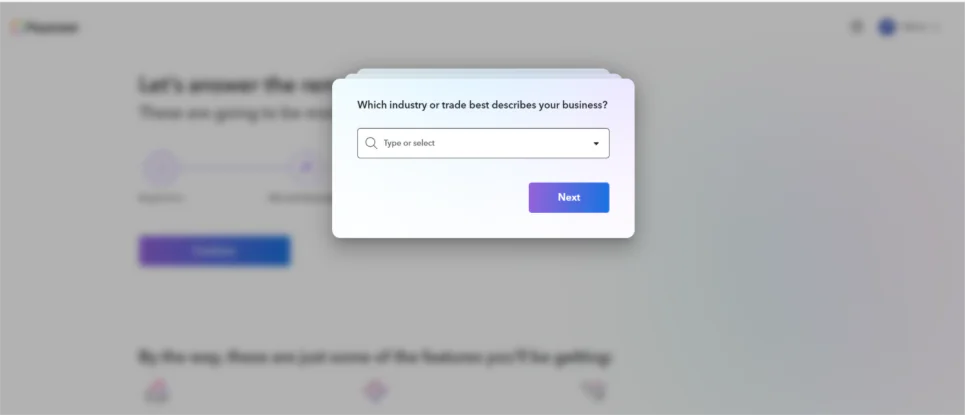
- Industry: Select the category that best describes your trade (e.g., Agricultural services, IT, etc.)
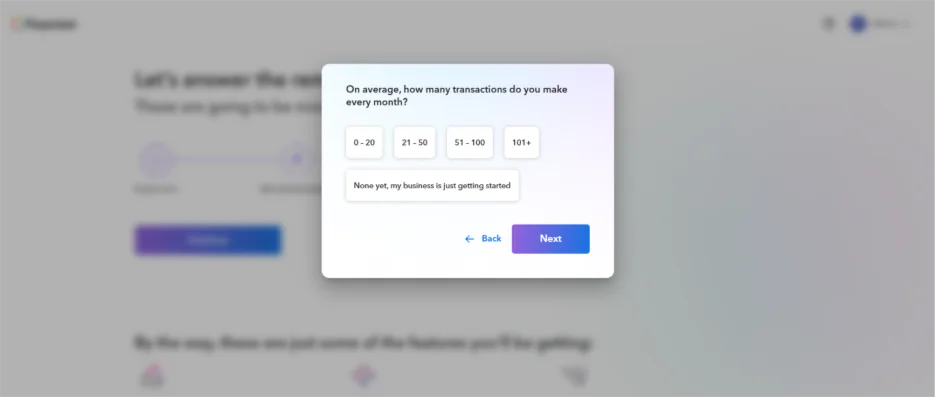
- Payments: estimate of how many transactions you make every month
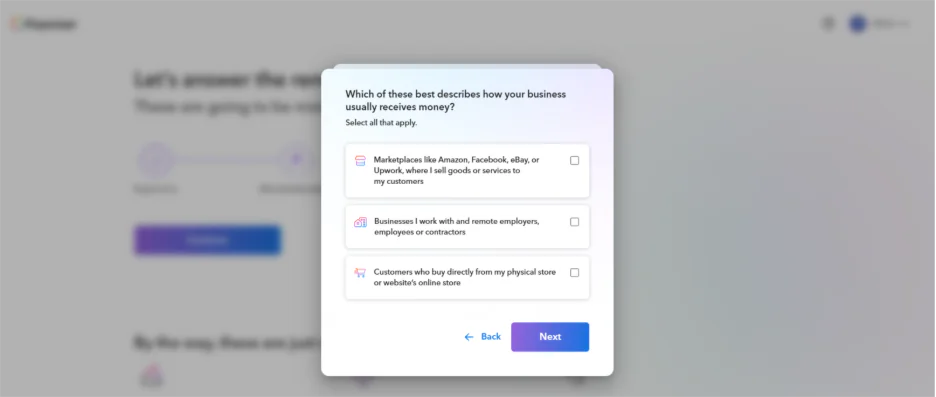
- How your business usually receives money (e.g. marketplace, direct clients):
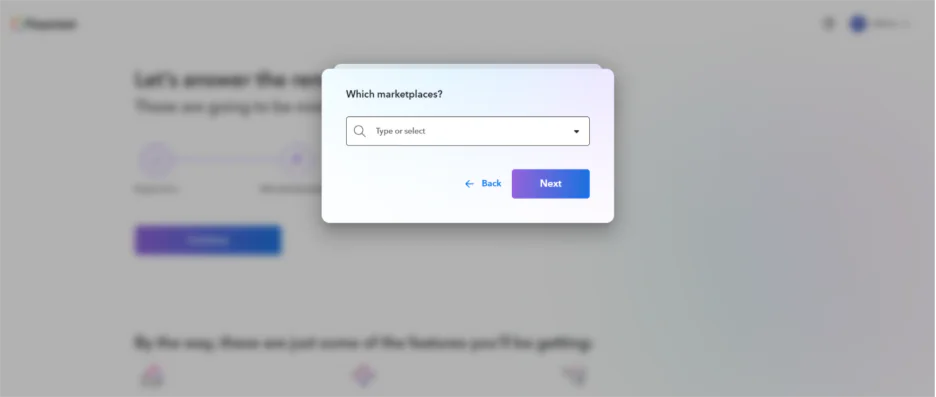
- Marketplaces: Select any platforms you work with, such as Amazon, Upwork, or eBay.
Step 3: Selecting Your Business Type
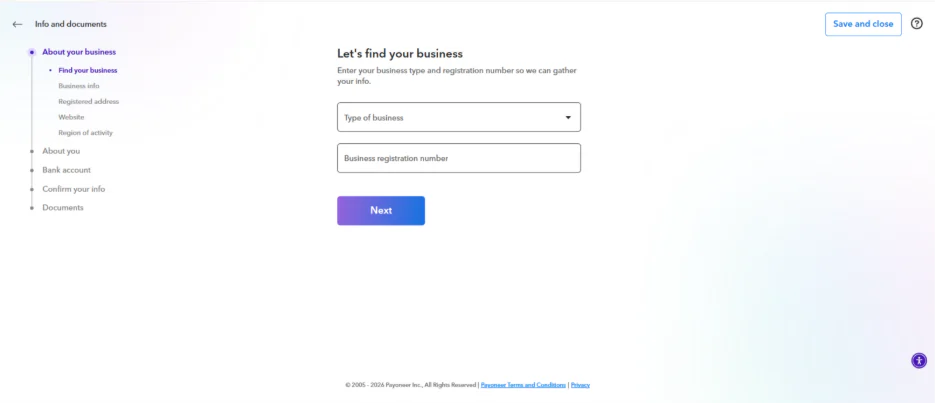
Choosing the correct legal structure is vital:
- Private Corporation (Co/Corp/Inc): For most regular Philippine corporations registered with the SEC.
- Public Corporation: For companies listed on the PSE.
- Partnership: For businesses registered as a general or limited partnership with the SEC.
- Non-profit (NPO): For foundations or non-stock entities.
- Note on LLC: Do not select LLC unless you are a foreign company; the Philippines does not use this designation for local entities.
Step 4: Company Details & Presence
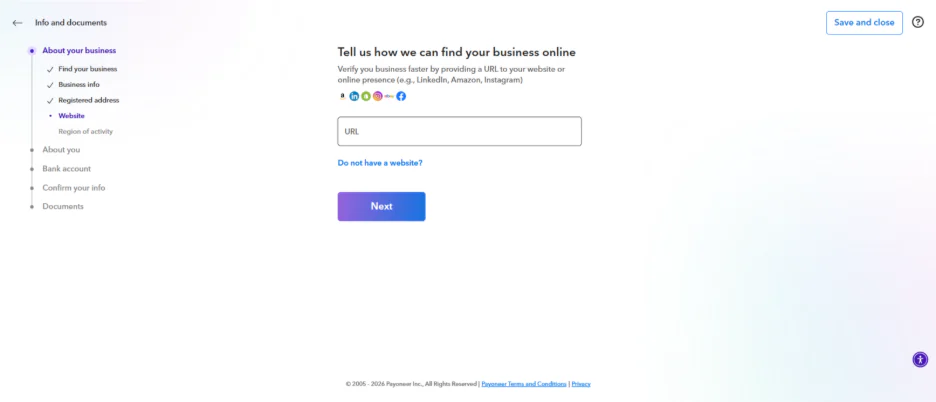
- Legal Name: Must exactly match your registration document.
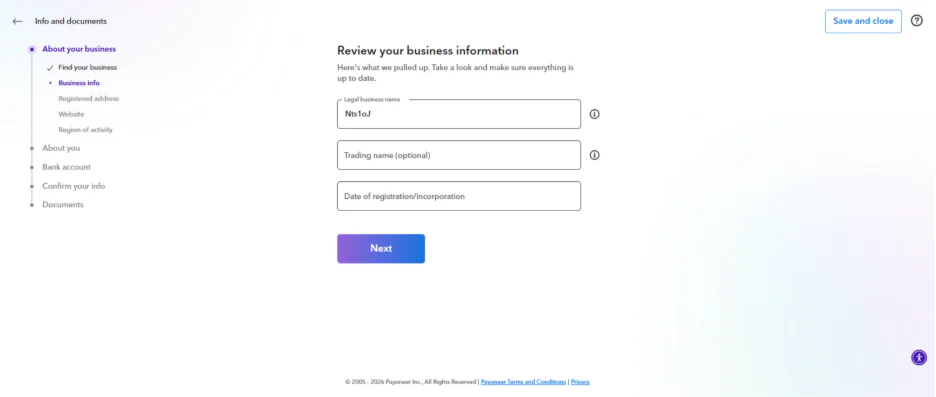
- Registered Address: Enter the company’s legally registered address exactly as it appears on your company verification documents. If your main office is elsewhere, check the “different address” box and provide the address. We may request an address verification document showing your company name and the address entered below.
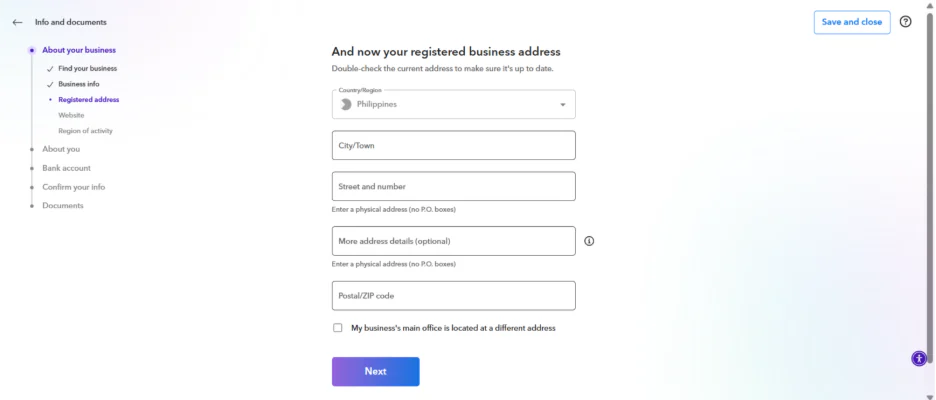
- Online Presence: Provide a URL to your website, marketplace store, or social media page (LinkedIn/Instagram).
- Tip: While you can continue without a URL, we may request a business URL and/or additional documents later, especially when you apply for additional features or your account activity increases.
Step 5: Authorized Representative Details
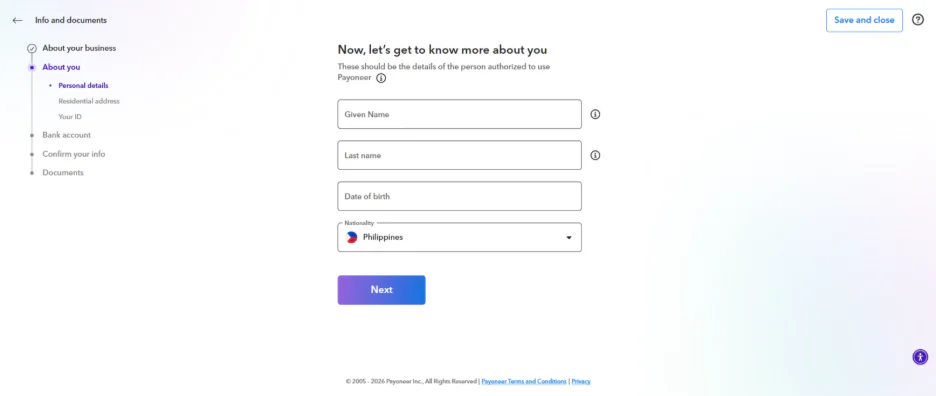
Enter the name, date of birth, and residential address of the person authorized to use the account. This person must be genuinely connected to the business (owner, director, or employee). You must also enter:
- The authorized representative’s SSS (Social Security System) number exactly as it appears on their SSS card or SSS records.
- Proof of Address in the authorized representative’s correct name and address entered during registration. You can choose from the following:
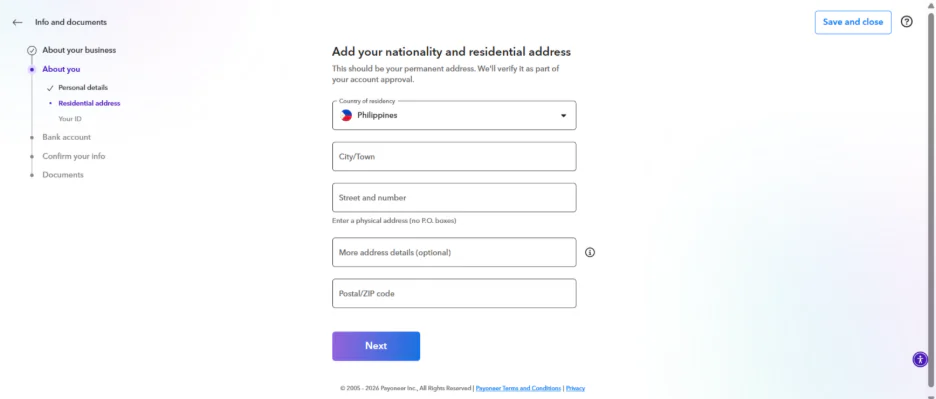
- National ID, Passport, Driver’s license
- Should not be expired at the time of submission
- Should contain exact same address registered in Payoneer
- Should be a different type from the one you submit under Visual Identity Verification
- Bank Statement under your authorized representative’s name and address
- Should contain your exact name and address registered in Payoneer
- Should be issued within 6 months
- Should contain bank’s letter head / logo
Step 6: Bank Account Connection
Link the Philippine bank account you will use for withdrawals.
- The bank account holder’s name must exactly match the company name you are registering.
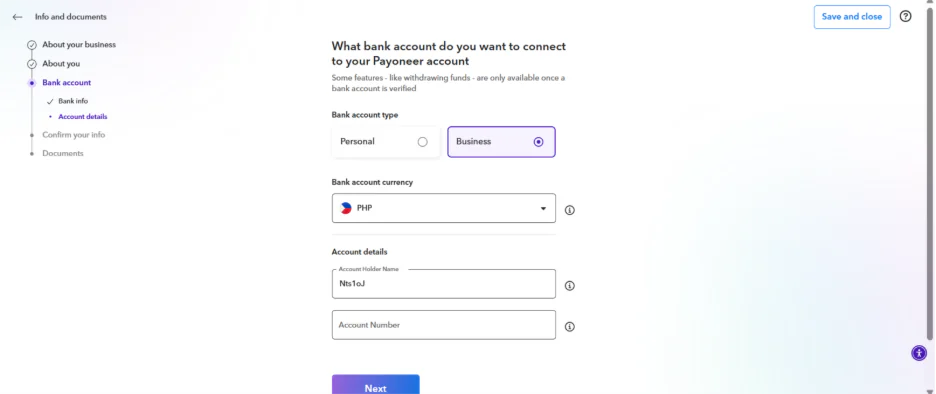
Step 7: Visual Identity Verification
You must complete a two-part security check:
- Photo ID: Capture a high-quality, color image of your government ID.
- Selfie: You will be prompted to place your face on an oval on-screen to verify your identity.
- Criteria: The image must be clear, readable, and show the entire document.
Step 8: Business Owner Information
Please provide business owner information that matches your actual company ownership structure. If your company has multiple ownership layers (e.g., a company owned by another company), we may ask you to provide details for each layer until we reach the final owner(s).
If your company does not have a UBO (Ultimate Beneficial Owner), please provide details of the most senior director or the person who ultimately controls the business.
After You Apply: What to Expect
- Review Timeline: Applications are usually reviewed within 3 business days after all documents are submitted.
- Verification Center: In some cases, we may need additional information or documents before we can approve your account. Please visit the Verification Center in your Payoneer account to check if there are any pending requests related to your application.
- Notifications: You will receive an email once approved. Be sure to check your spam/junk folders.
Important Rules to Remember
- One Account Only: Only one Payoneer account per person/company is allowed. New registrations for existing users will be automatically rejected.
- Payoneer vs. Local Banks: While Payoneer is excellent for global receiving and cross-border payments, a Philippine bank remains more suitable for daily local transactions and domestic payroll within the country.
Payoneer Business Account: Document Checklist
To ensure your application is processed within the typical 3 business day window, please prepare the following digital files before starting your registration. Ensure every document is in full color, high resolution, and shows the entire document from edge-to-edge.
1. Company Identity & Registration
Ensure the “Legal Business Name” and registration number you type into the application match these documents exactly.
- For Corporations: A high-quality scan of your SEC Certificate of Incorporation.
- For Tax Verification: Your BIR Certificate of Registration (Form 2303)—this is the most recommended document for Philippine businesses.
- For Partnerships: Your SEC Registration for general or limited partnerships.
- For Non-Profits: SEC registration for non-stock/non-profit foundations.
- Note for Sole Proprietors: If you are DTI-registered, you must apply for an Individual Account, not a Business Account.
2. Proof of Company Address (POCA)
The document must show the registered company name and the exact legal address as it appears on your SEC/BIR forms.
- Accepted Documents (issued within the last 3 months):
- Bank or Credit Card Statement under the company name.
- Utility Bill (Electricity, Water, Landline, or Internet) from providers like Meralco, PLDT, Globe, or Converge.
- Company Verification Document: Only if it explicitly lists the registered address.
3. Authorized Representative Verification
This is the person (owner, director, or employee) authorized to manage the account.
- Social Security: The representative’s SSS number exactly as it appears on official SSS records.
- Personal Identity (Visual Verification): A government-issued photo ID.
- Top Choices: PhilSys ID (National ID), Passport (must include the MRZ code), or Driver’s License.
- Secondary Options: UMID, SSS Card, Postal ID, GSIS Card, or PRC ID.
- Personal Proof of Address: A document showing the representative’s name and residential address.
- Option A: A different type of government ID than the one used for visual verification (e.g., if you used a Passport for Step 7, use a Driver’s License here).
- Option B: A Personal Bank Statement issued within the last 6 months featuring the bank’s logo/letterhead.
4. Business Ownership & Operations
- Ultimate Beneficial Owners (UBO): Details for any person or entity owning 25% or more of the company.
- Senior Management: If no one owns 25%, prepare details for the most senior director or controlling officer.
- Online Presence: A URL to your company website, marketplace store (Amazon/eBay/Upwork), or business social media (LinkedIn/Instagram).
- Tip: While not strictly mandatory to start, omitting this may lead to requests for extra documentation later.
5. Receiving & Withdrawal Setup
- Philippine Bank Account: A local account where the Account Holder Name exactly matches the Company Name registered on Payoneer.
- Business Profile: Be ready to select your specific Industry category and estimate your monthly payment volume.
Mandatory Criteria for ID Approval
| Criterion | Requirement |
| Color | Must be in full color (no black and white scans). |
| Visibility | Must be clear and readable; no blurry text or glares. |
| Completeness | All four corners must be visible; no cropped images or screenshots. |
| Consistency | Details must match your registration info character-for-character. |
| Validity | The ID must be current and not expired at the time of submission. |
Ready to scale your business?
Frequently asked questions (FAQs)
Opening a Payoneer account and maintaining it are free, subject to active use. However, there is an annual fee of $29.95 per card and various withdrawal and currency conversion fees. For more information, visit our pricing page.
To open a Payoneer account for business, you must provide the company’s registration documents, incorporation papers, identification code, passport details of the authorized person, bank account, and information about the service, for example, a link to the website or social media pages.
One person or company can have only one account, but within it, multiple currency accounts or sub-accounts can be created for teamwork if limited access is required.
Account verification usually takes 1 to 3 business days, but in the case of additional document verification, the process can take up to 5-7 days.
It is not necessary to be a sole trader to use the service, because the platform is also available for individuals, but having a sole trader or company can simplify verification and provide more opportunities for business development.
Related resources

Looking for an Employer of Record in Cyprus? Here’s what you need to know
Learn how to legally engage talent in Cyprus using a workforce management platform, and how Payoneer Workforce Management can support onboarding, payroll, and more.


Looking for an Employer of Record in Georgia? Here’s what you need to know
Here’s what you need to know about engaging talent in Georgia and how Payoneer Workforce Management can help you manage Georgia payroll, onboarding, and more.
Latest articles
-

Scale Your Global Business: How to Open a Payoneer Business Account in the Philippines
A comprehensive guide for SMEs to navigate registration requirements, document preparation, and cross-border payments.
-
Looking for an Employer of Record in Cyprus? Here’s what you need to know
Learn how to legally engage talent in Cyprus using a workforce management platform, and how Payoneer Workforce Management can support onboarding, payroll, and more.
-
Looking for an Employer of Record in Georgia? Here’s what you need to know
Here’s what you need to know about engaging talent in Georgia and how Payoneer Workforce Management can help you manage Georgia payroll, onboarding, and more.
-
Looking for an Employer of Record in Slovakia? Here’s what you need to know
Learn how workforce management platforms can help you compliantly engage, onboard, and pay employees in Slovakia.
-
Looking for an Employer of Record in Bulgaria? Here’s what you need to know
Learn how you can engage talent and pay employees in Bulgaria with a workforce management platform.
-
Employer of Record in Kenya
Learn about the services that an Employer of Record Kenya offers. Understand how EOR Kenya helps in onboarding, payroll, and benefits management.






Disclaimer
The information in this article/on this page is intended for marketing and informational purposes only and does not constitute legal, financial, tax, or professional advice in any context. Payoneer and Payoneer Workforce Management are not liable for the accuracy, completeness or reliability of the information provided herein. Any opinions expressed are those of the individual author and may not reflect the views of Payoneer or Payoneer Workforce Management. All representations and warranties regarding the information presented are disclaimed. The information in this article/on this page reflects the details available at the time of publication. For the most up-to-date information, please consult a Payoneer and/or Payoneer Workforce Management representative or account executive.
Availability of cards and other products is subject to customer’s eligibility. Not all products are available in all jurisdictions in the same manner. Nothing herein should be understood as solicitation outside the jurisdiction where Payoneer Inc. or its affiliates is licensed to engage in payment services, unless permitted by applicable laws. Depending on or your eligibility, you may be offered the Corporate Purchasing Mastercard, issued by First Century Bank, N.A., under a license by Mastercard® and provided to you by Payoneer Inc., or the Payoneer Business Premium Debit Mastercard®, issued and provided from Ireland by Payoneer Europe Limited under a license by Mastercard®.
Skuad Pte Limited (a Payoneer group company) and its affiliates & subsidiaries provide EoR, AoR, and contractor management services.
