
Making payments between Payoneer accounts
Overview
This flow pays a recipient's Payoneer account from a selected account balance using payments/pay_to_payoneer_account, then commits the charge after the user confirms. If Payoneer requires additional authentication, the commit step returns challenge_required until the user completes MFA.
Prerequisite: eligibility
Before integrating, call the eligibility endpoint to confirm the user may pay another Payoneer account and to obtain the minimum and maximum amounts permitted for each of their balances.
Call GET /v4/accounts/{account_id}/eligibility/pay_to_payoneer_account with the user's bearer token in the Authorization header and account_id in the path (both obtained during the user consent process). See the API reference guide for the full request and response.
curl -X GET \
https://api.sandbox.payoneer.com/v4/accounts/{account_id}/eligibility/pay_to_payoneer_account \
-H "Authorization: Bearer MXVNd2NTcTBlTi94NkZC…" \
-H 'content-type: application/json'
Sample eligibility response:
{
  "result": {
    "status": 2,
    "status_description": "eligible_available",
    "currencies": {
      "items": [
        {
          "currency": "USD",
          "monthly_available": 1000000,
          "monthly_limit": 1000000,
          "monthly_used": 0,
          "payout_methods": [
            {
              "id": "4366181923439479",
              "type": "CARD",
              "display_name": "USD card"
            }
          ]
        }
      ]
    }
  }
}
Confirm status_description is eligible before sending, and validate the amount against the per-currency min_amount and max_amount.
Implementation steps
a. Present balances and select balance
On your platform, show the balances held in the user's Payoneer account and let the user choose which balance to use to pay the supplier (or payee).
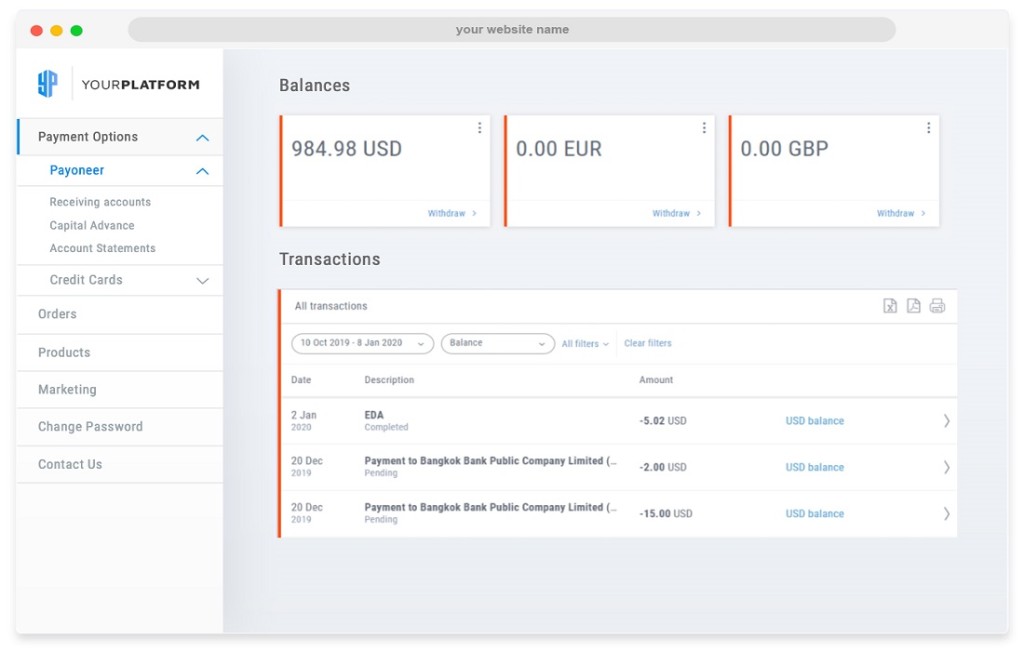
b. Send payment (POST payments/pay_to_payoneer_account)
Call POST /v4/accounts/{account_id}/balances/{balance_id}/payments/pay_to_payoneer_account with the recipient identified by email in the to object. Include purpose_of_payment when your program requires it. Example (sandbox):
curl --request POST \
  --url https://api.sandbox.payoneer.com/v4/accounts/{account_id}/balances/{balance_id}/payments/pay_to_payoneer_account \
  --header 'Accept: application/json' \
  --header 'Authorization: Bearer 123' \
  --header 'Content-Type: application/json' \
  --data '{
  "client_reference_id": "test1234",
  "amount": 50.25,
  "description": "some description of transaction",
  "purpose_of_payment": 1,
  "to": {
    "type": "email",
    "id": "testmap01@mailinator.com"
  }
}'
Purpose of payment
purpose_of_payment is a numeric code that classifies the reason for the payment. It is required in some corridors and programs and ignored where it does not apply. Common values:
| Value | Purpose |
|---|---|
1 | Payment for goods |
2 | Payment for services |
3 | Transfer to own or related account |
4 | Family support or gift |
5 | Other permitted purpose |
The accepted codes — and whether the field is mandatory — are program- and corridor-specific. Confirm the exact list for your program in the API reference rather than hardcoding values.
API response (pay_to_payoneer_account)
Example response body after a successful pay_to_payoneer_account request (includes commit_id for the next step):
{
  "result": {
    "commit_id": "600a3b52-e666-4a5c-ba93-7795bf0862e3",
    "expires_at": "2023-03-21T21:28:13.8758878Z",
    "type": "send",
    "client_reference_id": "test1234",
    "request_details": {
      "url": "/accounts/2968916/balances/4366181893241238/payments/pay_to_payoneer_account",
      "body": {
        "client_reference_id": "test1234",
        "amount": 50.25,
        "description": "some description of transaction",
        "purpose_of_payment": 1,
        "to": {
          "type": "email",
          "id": "testmap01@mailinator.com"
        }
      }
    },
    "from": {
      "type": "balance",
      "id": "4366181893241238"
    },
    "to": {
      "type": "email",
      "id": "testmap01@mailinator.com"
    },
    "fees": [
      {
        "type": "transfer_fee",
        "amount": 0.2,
        "currency": "USD"
      }
    ],
    "amounts": {
      "charged": {
        "amount": 50.25,
        "currency": "USD"
      },
      "target": {
        "amount": 50.05,
        "currency": "USD"
      }
    }
  }
}
c. User confirmation and fees
Users must confirm agreement to charging their Payoneer balance. Present the transaction details and fees returned from the pay_to_payoneer_account response and ask the customer to confirm before you commit.
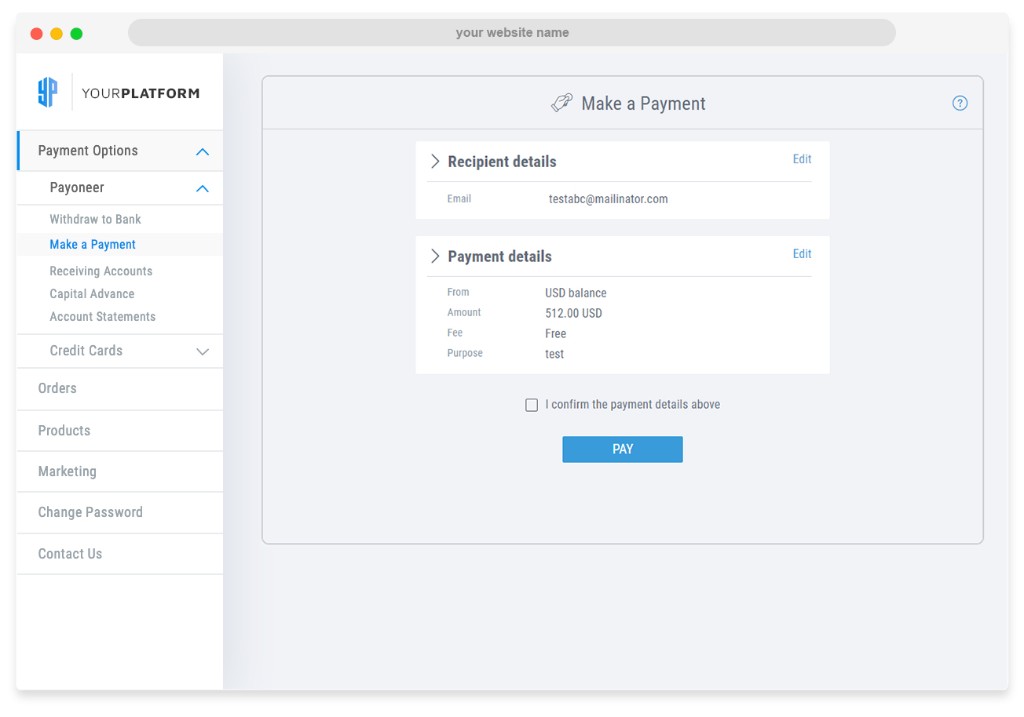
d. Commit the payment
After the user reviews and confirms fees and charges, call PUT to commit the payment to Payoneer:
curl -X PUT \
https://api.sandbox.payoneer.com/v4/accounts/{account_id}/payments/{commit_id} \
-H "Authorization: Bearer MXVNd2NTcTBlTi94NkZC…" \
-H 'content-type: application/json'
Challenge required (403 Forbidden)
If the user must pass a challenge (e.g. MFA), the commit request may return 403 Forbidden with error set to challenge_required. Example body:
{
    "error": "challenge_required",
    "error_description": "Challenge authentication required. Please see 'challenge' in response for more details.",
    "error_details": {
        "code": 1803
    },
    "challenge": {
        "type": "mfa",
        "expires_at": "2026-01-14T15:14:59.544Z",
        "challenge_reference": "1e786e90701f4d90b6fbd69a64cea43f",
        "session_id": "e57e9b2e-c3fb-487f-aa79-d9cd43a34cfa",
        "url": "https://auth.payoneer.com/#?t=e57e9b2e-c3fb-487f-aa79-d9cd43a34cfa&challenge_reference=1e786e90701f4d90b6fbd69a64cea43f&v=a"
    }
}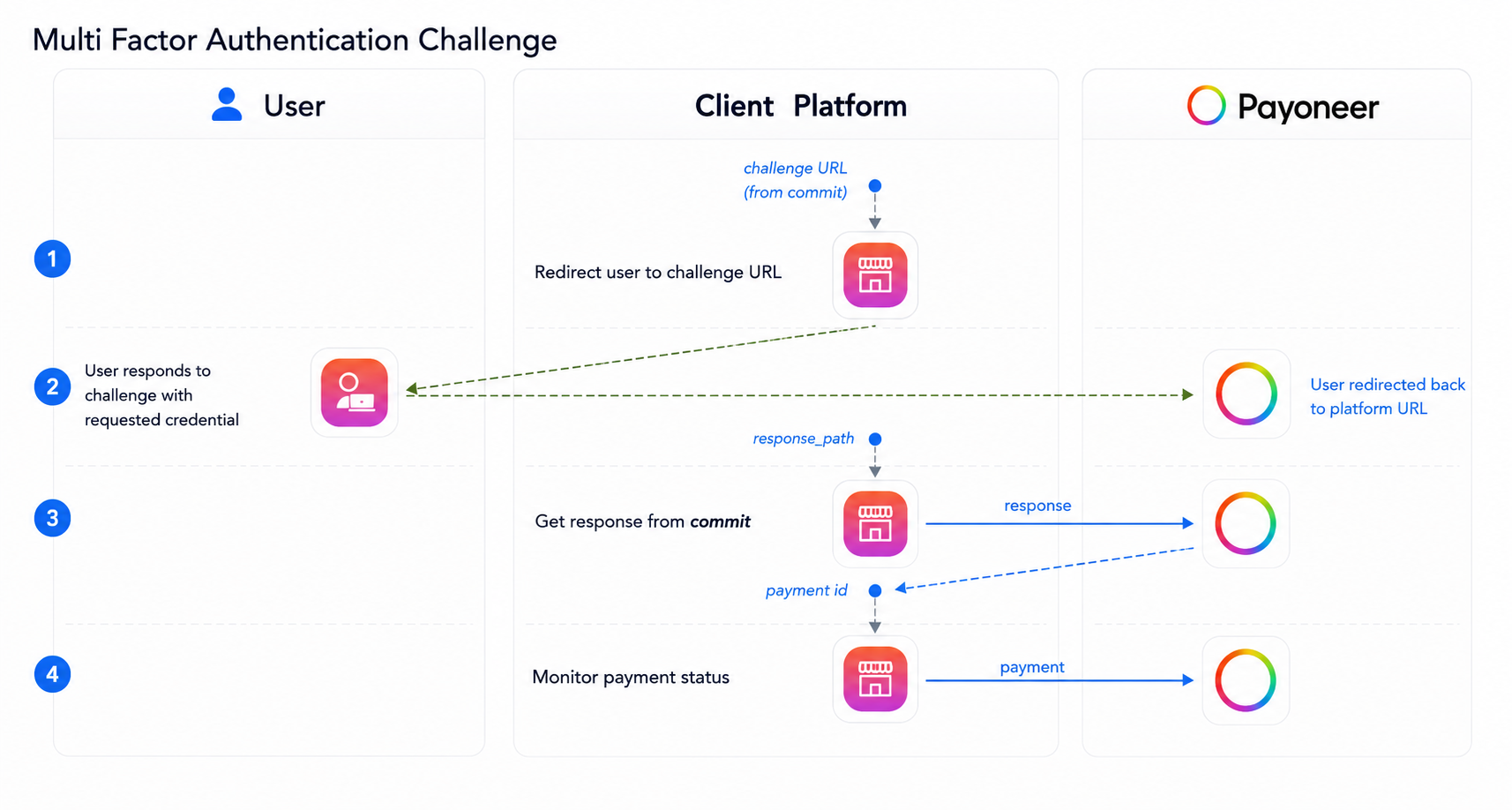
url, then retry commit after authentication.Straight success response (commit)
When the commit succeeds without a pending challenge, the response can look like the following (example):
{
    "result": {
        "payment_id": "1665404354",
        "status": 1,
        "status_description": "in_progress",
        "last_status": "2025-10-13T13:37:26.15Z",
        "created_at": "2025-10-13T13:37:26.0741182Z",
        "type": "send",
        "client_reference_id": "tedstf3f4fa234",
        "request_details": {
            "url": "/accounts/9087002/balances/4366181923439479/payments/pay_to_payoneer_account",
            "body": {
                "client_reference_id": "tedstf3f4fa234",
                "amount": 50.25,
                "description": "some description of transaction",
                "purpose_of_payment": 1,
                "to": {
                    "type": "email",
                    "id": "PayeeID081121V1@mailinator.com"
                }
            }
        },
        "from": {
            "type": "card",
            "id": "4366181923439479"
        },
        "to": {
            "type": "email",
            "id": "PayeeID081121V1@mailinator.com"
        },
        "amounts": {
            "charged": {
                "amount": 50.25,
                "currency": "USD"
            },
            "target": {
                "amount": 50.25,
                "currency": "USD"
            }
        }
    }
}